
Wunder Mobility changelog
Release 12-2026 - Damage Capture & Distance Bundles
Highlights
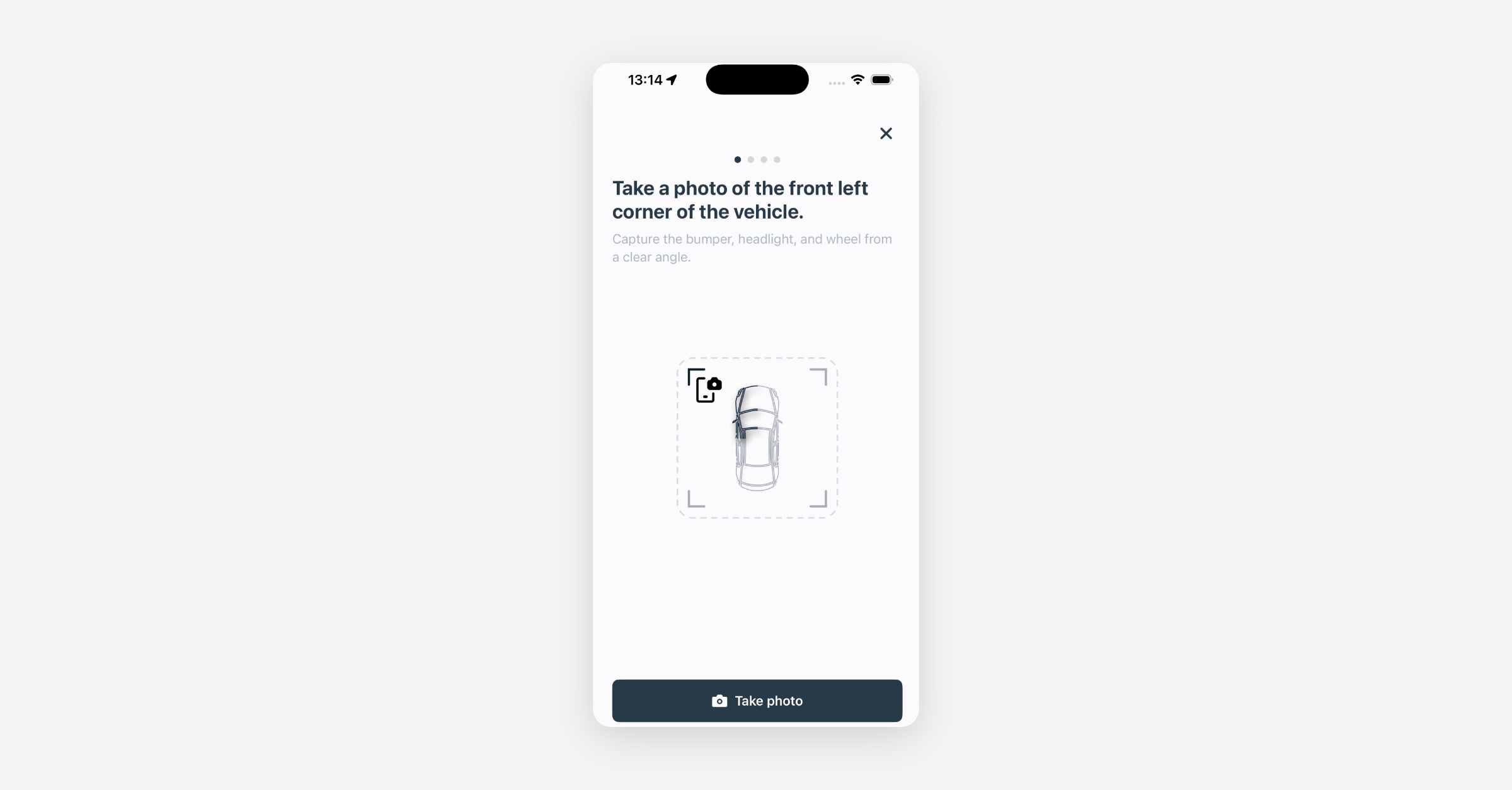
Vehicle Condition Capture: When ending a rental, riders are now guided through a four-step photo flow — capturing the vehicle from four different angles with static illustrations guiding each shot. The photos are uploaded and linked to the rental automatically, giving operators a reliable visual baseline for every return to resolve damage disputes faster and deter fraudulent claims.
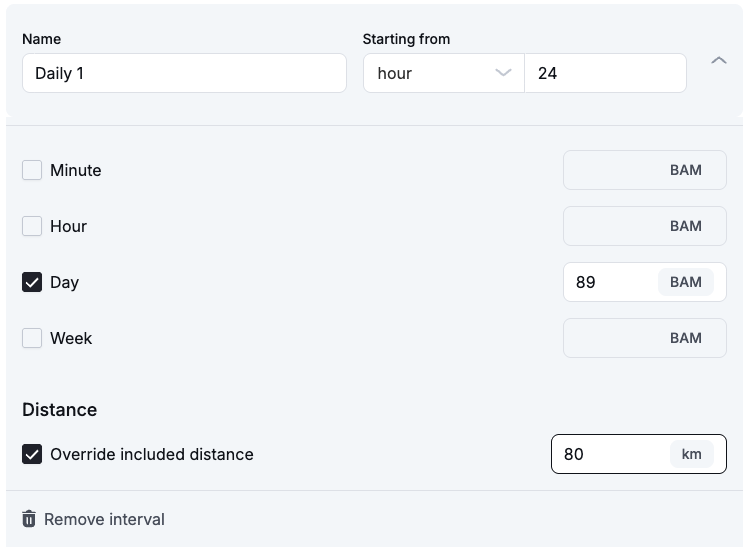
Included Kilometres in Booking Pricing Bundles: Tailor included distance by time-slot to offer better value on longer bookings while charging for overages. This helps maximise revenue from extended rentals without penalising users. Customers see the included distance upfront on the booking summary before confirming. Configure this in Booking > Pricing Bundles > Adaptive Rates.
Mobile App
General
Walking Distance Overlay Fix: The walking distance overlay setting now correctly accepts a zero value, allowing operators to hide the walking radius circle on the map when not needed.
On-Demand
On-Demand Filters Polish: UX improvements and minor fixes to the on-demand filtering experience on mobile, making it smoother to narrow down available vehicles.
New Dashboard
General
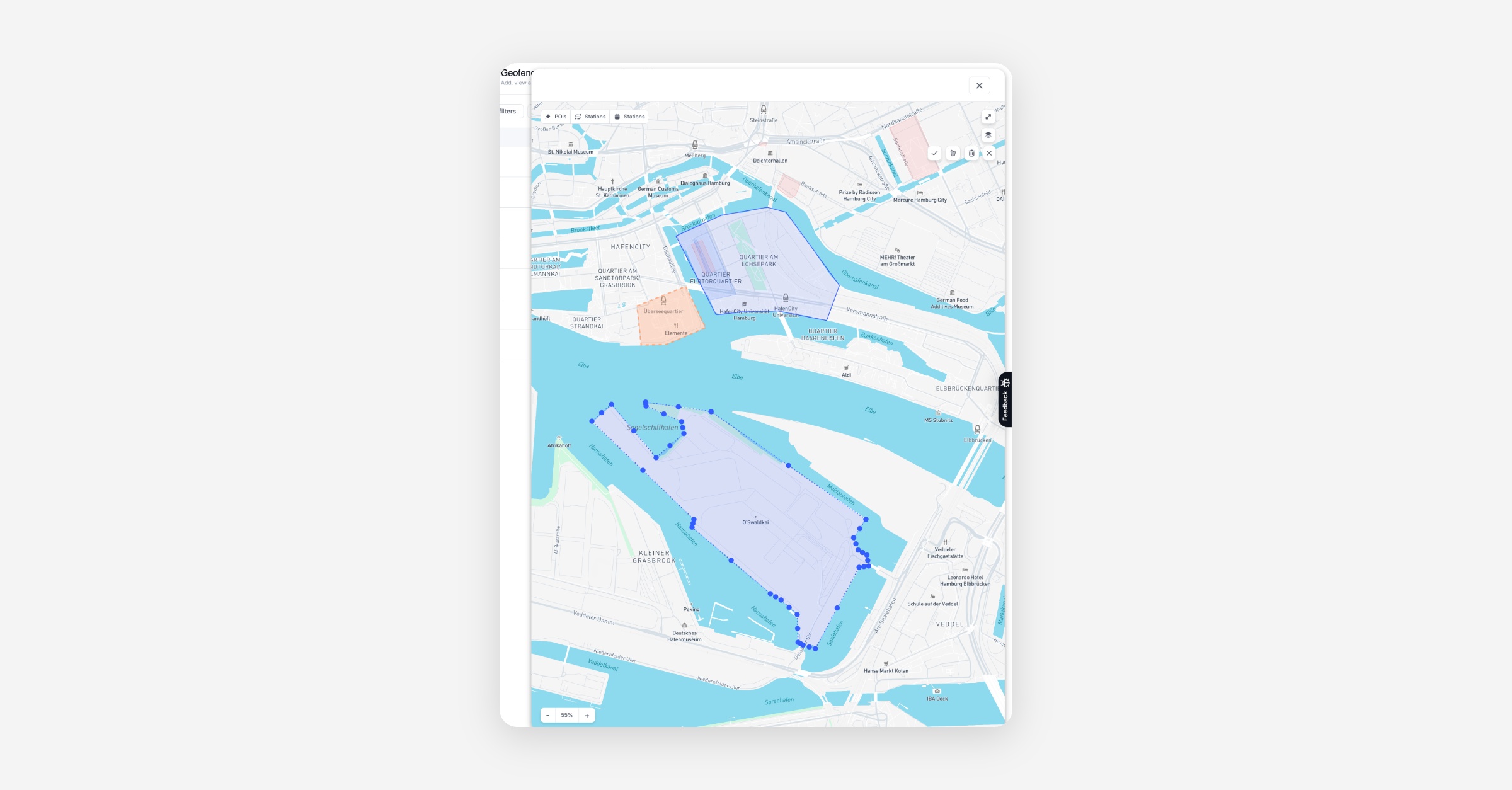
Multiple Areas per Promotion: Geofencing-based promotions now correctly support multiple geo-fences within a single area definition. All linked geo-fences are visible and editable without data loss.
QR Code Download: Operators can now download QR codes directly from the Dashboard, speeding up hardware labeling and vehicle onboarding.
Legacy Data Maps Removed: Older data maps have been removed from the Dashboard or a cleaner dashboard experience. All map data is available in the Ops Map.
Auto-created damage tasks now link to damages: Fixed an issue where tasks created automatically from damage reports were not linked back to the triggering damage. Tasks and damages are now connected in both directions, so operators can trace the full context without manual lookups.
B2B
Voucher Visibility in B2B Profiles: Fixed a bug where voucherables limited only to “Business” account types were not shown when adding vouchers to Business Accounts.
Booking
Duplicate Timeslot Validation Fix: The pricing bundles validation now correctly honors the time unit when checking for duplicate timeslots, preventing false-positive conflicts.
Vehicle Category Reassignment: Operators can now change a vehicle's category after assignment in the Dashboard without errors, including proper unassignment of the current vehicle and re-validation against station availability.
License Plate Display Fix: Fixed an issue where license plates of assigned vehicles appeared gray instead of black on the station booking calendar, making it easier to distinguish assigned vehicles from planned ones.
Platform
General
Re-verification Cron Fix: The driver license re-verification cron now correctly advances accounts to PENDING_REVERIFICATION status, ensuring users hitting the reverification threshold are properly prompted.
IoT Unlinking State Preservation: Unlinking an IoT module from a vehicle no longer flips the service state to OTHER if the vehicle was already marked as out of order — the true status is preserved.
High Damage Severity Level: Added a "high" damage severity option so operators can flag critical cases consistently, enabling faster triage and urgent repair routing.
API
General
Vehicle Damage Files Endpoint: The front vehicle damages endpoint now exposes associated files, so integrators can view and download damage evidence directly via the API — useful for faster claims and audits.
Integration Type in Vehicle Export: The IoT module integration type is now saved and exposed in vehicle exports, enabling integrators to audit connectivity configurations in their CSV data.
Data / BI
General
Task export now includes new task categories: Task exports now include all 12 task categories. Previously, exported task data only showed 6 of the available categories, meaning newer ones like Damage, Vehicle Fault, or Billing appeared without a label.