
Wunder Mobility changelog
Release 30-2026 - Booking Reliability
Highlights
Business account members now see private stations immediately after login: A bug was causing private stations to be invisible to business account members until after a full app restart, affecting all members at several operators. The fix ensures private stations appear as soon as the user logs in on iOS and Android.
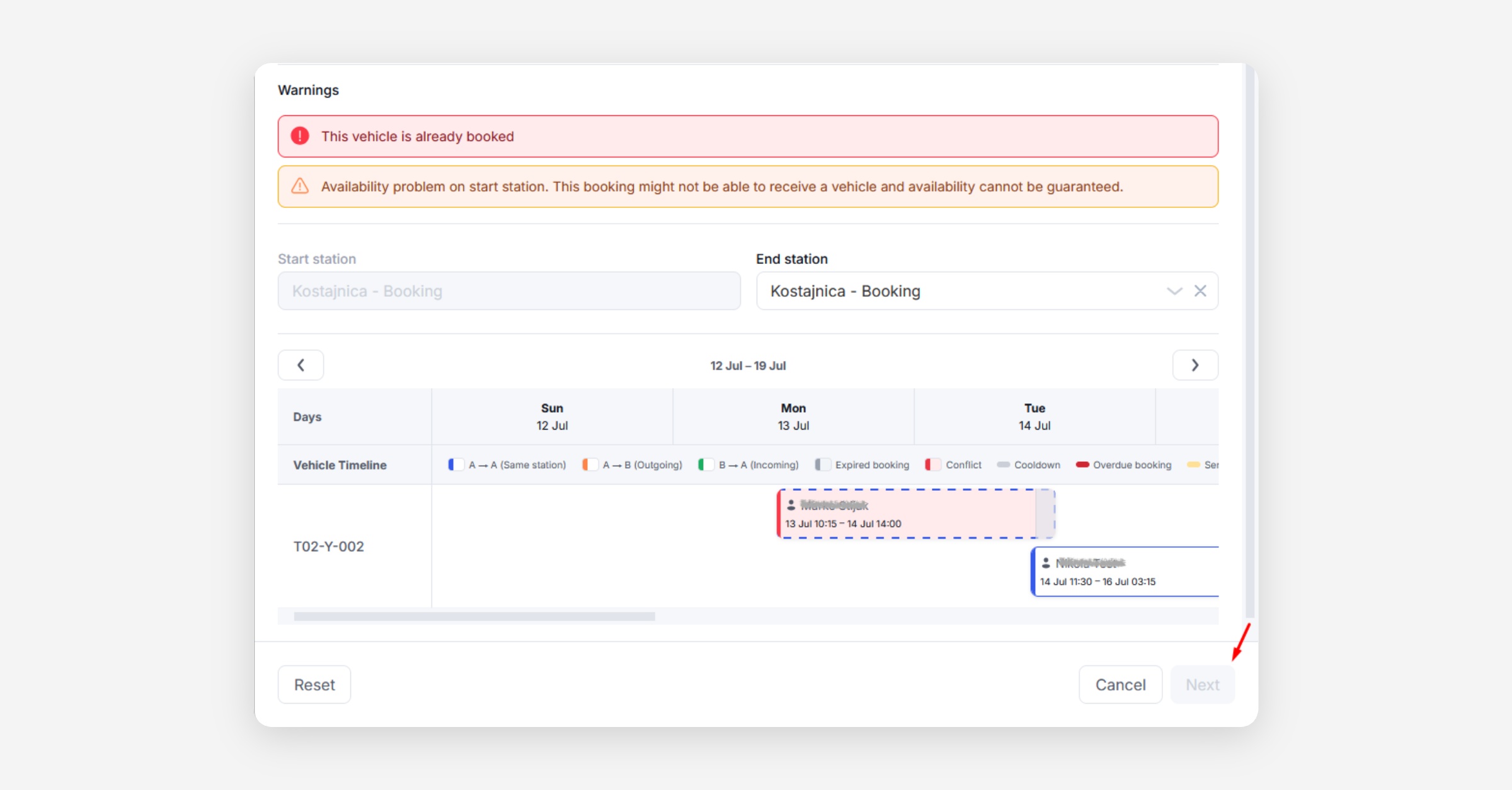
Smarter handling of vehicle conflicts when editing or extending a booking: Editing or extending a booking has always guarded against putting an assigned vehicle on overlapping bookings, but the edit flow did this bluntly and would clear the assigned vehicle, forcing a manual re-selection. Handling is now more precise and depends on how the vehicle was assigned. If the vehicle is pre-assigned and the change would clash with another booking on the same vehicle, the change is blocked with a warning until you adjust the dates. If it was auto-assigned, you get a non-blocking warning and can still confirm, and the planner reassigns a vehicle to the other booking where one is free. Applies to both active rentals and scheduled bookings.
Mobile App
Requires the latest app version. Contact your Customer Success Manager for details.
Booking
Booking confirmation no longer returns a false "no vehicles available" error: Users booking through the app occasionally received an availability error at the final confirmation step for a time slot that was in fact bookable via the operator's back office. The underlying availability check has been corrected so the app and the back office now agree on what is available.
On-demand
False-positive radar notifications resolved: Users who set up a vehicle radar alert were occasionally receiving push notifications even when no qualifying vehicle had entered their area. The backend logic triggering radar notifications has been adjusted, reducing false alerts and improving radar reliability.
End-of-rental photo capture follows a continuous walk-around sequence: The order in which users photograph vehicle condition at the end of a rental has been updated to follow a continuous path around the vehicle (front-left, front-right, rear-right, rear-left), removing the need to cross to the far side and back. This reduces friction and the likelihood of photographing the wrong panel.
B2B
Private stations now appear immediately after login for business account members: Business account members were not seeing their private stations in the app until they restarted it. The fix ensures private stations are loaded and displayed as soon as the user logs in, on both iOS and Android.
General
Voucher card status is now clearly labelled: Voucher cards in the Promotions section previously used colour alone to indicate their status (active, expired, used), with no legend or text label. The status is now shown as a readable label on each card, so riders can understand their vouchers at a glance without needing to interpret colour codes.
New Dashboard
Booking
Smarter handling of vehicle conflicts when editing or extending a booking: Vehicle conflicts in the booking edit flow are now handled based on how the vehicle was assigned, rather than clearing the assigned vehicle and forcing a re-selection. A pre-assigned vehicle whose booking would clash is blocked with a warning until resolved, and an auto-assigned vehicle shows a non-blocking warning and can still be saved. Applies to active rentals and scheduled bookings.
General
Issue template picker now supports search: Operators creating an issue in the back office can now type to filter the issue template list, rather than scrolling through the full set of templates to find the right one.
Free-minute rewards now configurable in the Vehicle Promotions UI: The backend has supported minute-based rewards on vehicle promotions for some time, but the Dashboard UI had no way to set them. Operators can now configure a free-minutes benefit directly in the Vehicle Promotions section in goDash, without needing a manual backend change.
Platform
API
General
Vouchers now indicate which price component their discount applies to: The Users Vouchers API response now includes a field identifying whether each voucher's discount applies to the unlock fee or the per-minute rate. This allows client applications to display the correct breakdown of a rider's next trip cost, for example showing a free unlock separately from a rate discount.
Operator API endpoint for assigning a subscription to a user: A new operator API endpoint allows subscriptions to be assigned to a user on their behalf, covering scenarios such as cycle-to-work programmes, corporate account provisioning, and customer support cases where the user cannot self-serve. The endpoint accepts a user identifier, subscription tier, and an optional start date and payment waiver.
Segway vehicles now supported in the device-level operator API: The device-level operator API (used by integration partners to manage hardware directly) now includes native support for Segway vehicles, matching the functionality previously available only through the legacy device cloud. Partners managing Segway fleets can now operate them through the standard API path.