
Wunder Mobility changelog
Release 33-2026 - Sharper AI & Fleet Operations Polish
Highlights
Wunder AI gains depth and trustworthiness: Operators using Wunder AI now get answers grounded in the right data definitions, with demand and app-open metrics now reachable for entitled roles, a corrected "new customers" calculation aligned with the governed sign-up cohort, and role-aware capability descriptions that no longer suggest data domains the user cannot access. Feedback can now include optional free-text comments after a thumbs-up or thumbs-down, giving the product team richer signal to keep improving answer quality. Wunder AI responses also continue streaming in the background when the operator navigates to another page, so answers are never lost mid-session.
Mobile App
Requires the latest app version. Contact your Customer Success Manager for details.
On-demand
Wallet payment-method add no longer loops through verification: Adding a payment method from the Wallet no longer incorrectly triggers the identity verification step. After adding a card, riders remain in the Wallet and see the new card immediately, and the sign-up flow is unaffected.
General
Station pins render reliably across all zoom levels: On the rider app, all stations within the visible map area now appear consistently regardless of zoom level. Previously, stations visible at one zoom level could disappear at another, causing riders to miss available stations.
Deep-link fallback routes iOS users to the correct App Store storefront: The no-app fallback for a universal link now redirects users to the correct regional App Store rather than the US storefront, ensuring visitors without the app installed reach a valid download page rather than a dead link.
New Dashboard
General
Verification queue pagination no longer closes the side panel: When an operator selects the last user on a page and clicks Next, the side panel now advances to the first user on the following page rather than closing unexpectedly.
Promotion redeem limits configurable by operators: Operators can now set an overall redeem limit and a per-user redeem limit when configuring a promotion. Once a limit is reached, further redemptions are automatically blocked, removing the need to manually deactivate campaigns.
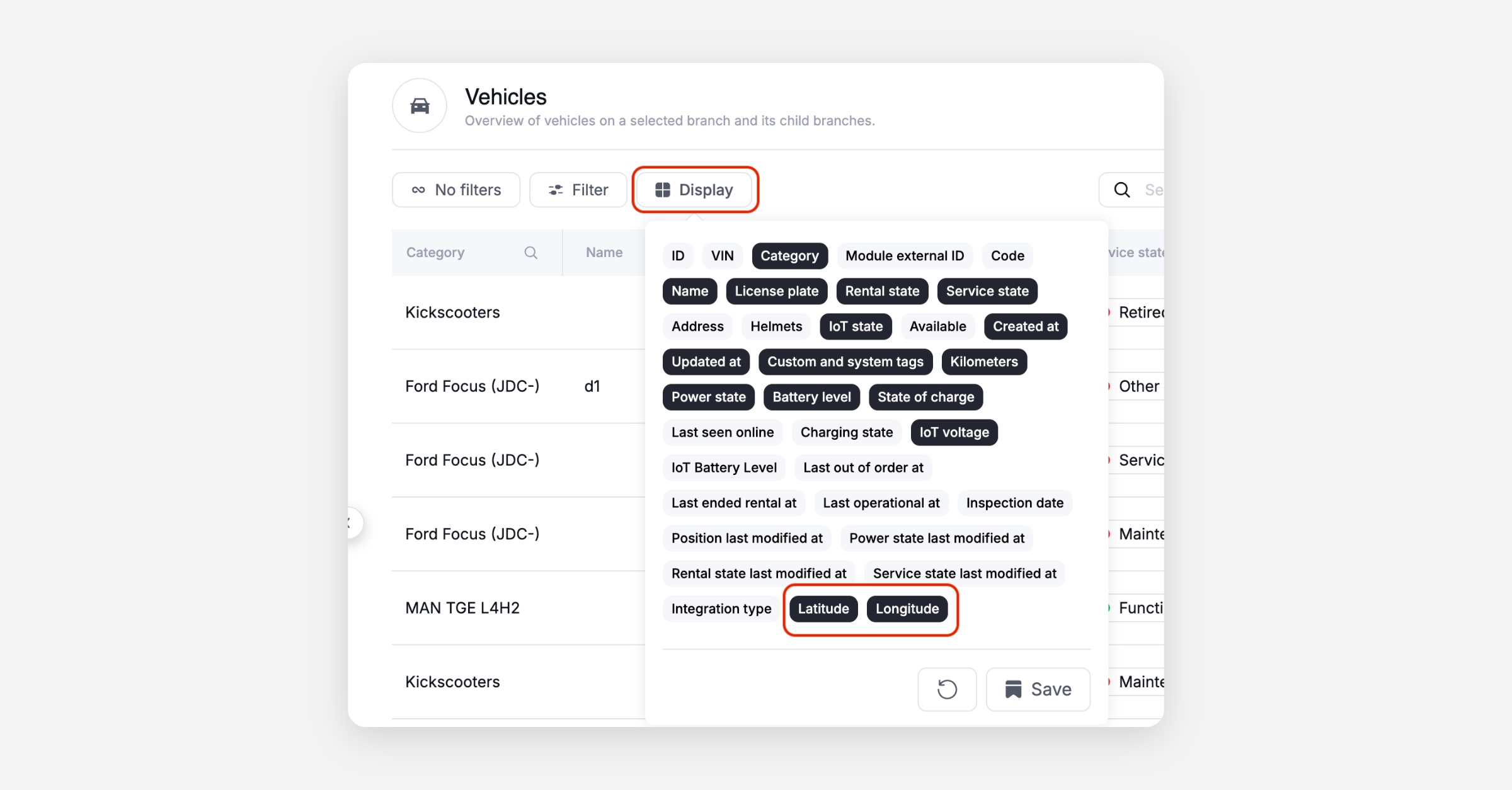
Vehicle list export includes GPS coordinates: The vehicle list export from the dashboard now includes latitude and longitude columns for every vehicle, so fleet operations teams can work with location data directly from the export without pulling it separately.
Station compatibility: select-all and deselect-all for compatible stations: When configuring station compatibility, clicking the parent checkbox now selects all compatible stations on the first click and deselects all on the second, matching standard checkbox-group behavior and making bulk configuration faster.
Voucher names appear correctly in the app and on invoices from creation: Newly created promotions, passes, and voucherables now display their configured names immediately in the rider app and on invoices, without requiring an operator to manually publish localization changes afterwards.
Platform
General
Stripe Link payment methods accepted for recurring charges: A payment compatibility issue that caused recurring charges to fail when a customer had stored a Stripe Link payment method has been resolved. Renewals and post-rental charges now process reliably for these payment methods without manual intervention.
Booking request vehicle assignment now persists through confirmation: A vehicle assigned to a booking request during the request flow is now retained when the request is confirmed. Previously the assignment was silently dropped, requiring the operator to reassign the vehicle after confirmation.
Vehicle max speed now readable via the API: The currently set maximum speed for a vehicle is now returned by the vehicle telemetry endpoint, so integrations and tooling can read a vehicle's speed cap directly. Available for OKAI bikes only.
API
General
Vehicle GPS coordinates available in export and vehicle list: Latitude and longitude are now included in the vehicle list export and in the API response for vehicle lists, giving integration partners and ops tooling direct access to position data without secondary lookups.
Vehicle max speed exposed via the telemetry API: The currently configured maximum speed for a vehicle is now available through the API. Supported for OKAI bikes only.
Data / BI
General
Curated example prompts guide operators into Wunder AI: Operators opening Wunder AI now see three curated example prompts on an empty chat, giving immediate entry points into the most common questions rather than a blank input box.
Wunder AI feedback now accepts optional comments: After rating an answer with a thumbs-up or thumbs-down, operators can add a short text comment explaining what was helpful or what fell short. The feedback is stored alongside the rating to improve future answer quality.
Wunder AI answers reflect your role's actual data permissions: Wunder AI no longer describes capabilities or suggests follow-up questions that fall outside the signed-in user's data permissions. Roles with access to demand data can now retrieve app-open figures, and the "new customers" metric now returns the correct sign-up cohort figure rather than a proxy count.
Wunder AI answers continue streaming when you navigate away: An answer that is still generating no longer stops when the operator opens another page in the dashboard. The stream continues in the background, and the completed answer is available when the operator returns to the chat.
Service App
General
Service app login no longer blocked by a false permissions error: Field team members whose role includes the required task permission now log into the service app successfully. Previously, a mismatch between the permission check and the role configuration caused a permissions error on login, blocking daily fleet maintenance tasks.