
Wunder Mobility changelog
Release 36-2026 - App Tracking Consent
Highlights
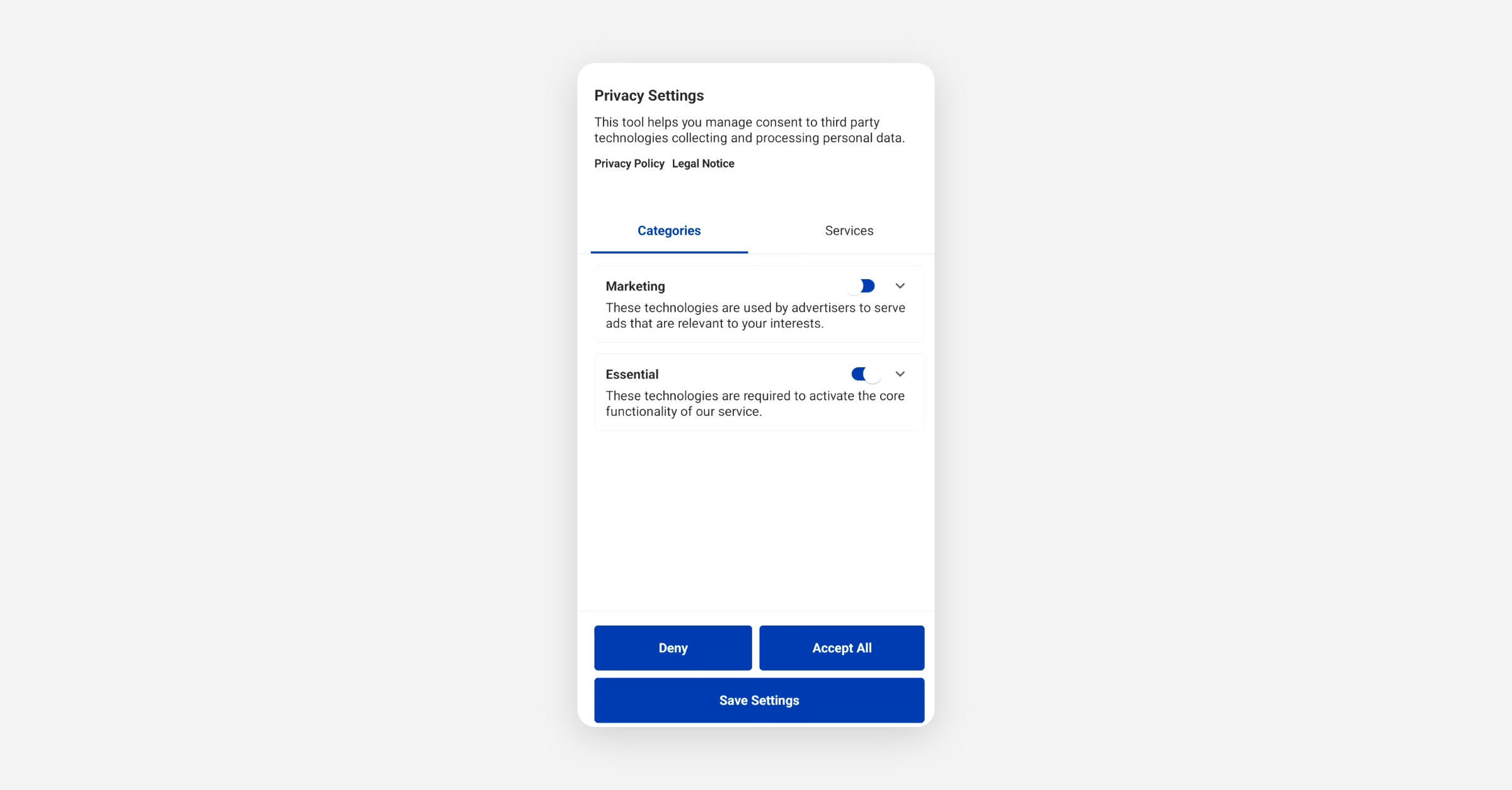
Tracking Consent Layer in the Mobile App: A fully integrated consent management layer is now available in the rider app. Riders are presented with a consent prompt before any analytics or marketing tracking begins, and the app enforces consent choices across all downstream destinations. Operators in regulated markets can now meet GDPR consent requirements without custom workarounds.
Mobile App
Requires the latest app version. Contact your Customer Success Manager for details.
General
Tracking Consent Management: The rider app now includes a consent layer. Before any analytics or marketing tracking begins, riders are presented with a clear consent prompt. Consent choices are enforced consistently across all tracking destinations (Amplitude, Braze, AppsFlyer and Sentry), with fail-closed semantics so no data flows until consent is given. Operators in regulated markets can use this to meet GDPR and PDPA requirements out of the box.
On-demand
Fuel Card PIN Visible During Active Rentals: Riders renting vehicles that require a physical fuel card can now see the correct fuel card PIN for their specific vehicle directly on the vehicle card during an active rental. Different vehicles carry different fuel cards, and this eliminates the need for operators to communicate PINs through separate channels.
Service App
General
Open Tasks List Now Shows Only Open Tasks: The "Open Tasks" section in the vehicle detail sheet was displaying all tasks on a vehicle, including completed ones, despite the section header count being correct. The list now filters to open tasks only, so field teams no longer have to mentally filter out resolved items.
Service App Uses Dedicated Task and Damage Endpoints: The Service App's maintenance sidebar now fetches open tasks and open damages from purpose-built endpoints. This improves load accuracy and performance, particularly on larger fleets, and ensures the sidebar data stays consistent even as the underlying vehicle API evolves.
Last Rental Info and After-Rental Photos Now Visible: Field teams can now see the details of a vehicle's most recent rental, including after-rental photos, directly in the Service App. This gives street workers the information they need to locate a vehicle in the field without switching to another tool or contacting the back office.
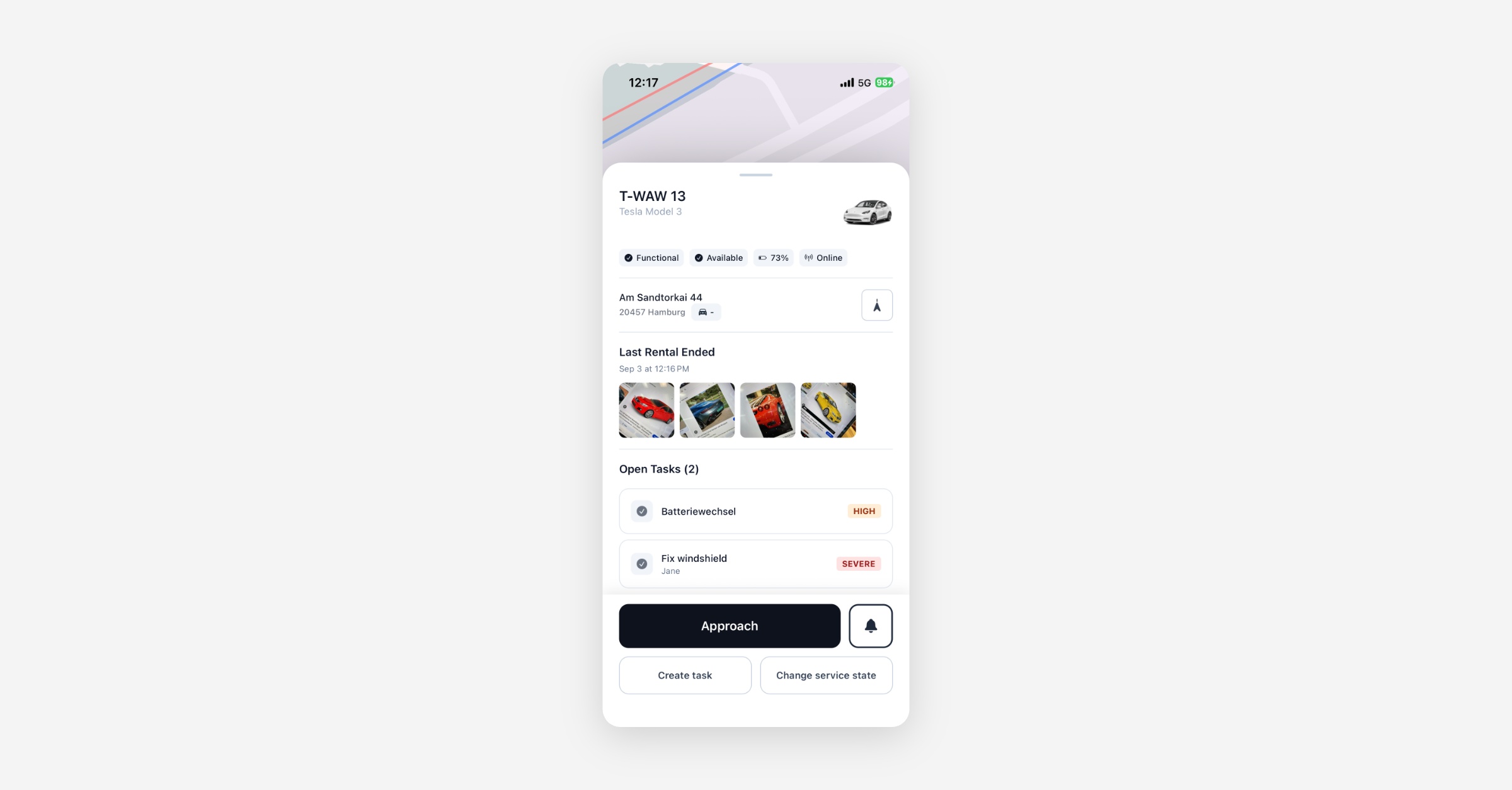
Charge Card Assignments Visible per Vehicle: The vehicle detail view in the Service App now shows which RFID charge cards are assigned to each vehicle. Field teams standing at a car can instantly confirm which physical card belongs to that vehicle, without having to check a separate system.
Battery Filter Supports a Min-Max Range: The battery percentage filter in the Service App now accepts a range (for example, 90% to 100%) instead of only an upper bound. This makes it faster to identify vehicles in a specific charge window, such as those that are nearly full and ready for deployment.
New Dashboard
General
Campaign Reference Field on Promotions and Unique Codes: Operators can now attach an optional free-text campaign or external reference to any Promotion or batch of Unique Codes. This field is used for grouping in payment reporting and data analysis, making it straightforward to attribute redemptions back to a specific campaign without post-processing. The field is editable on Promotions until the first redemption.
Voucher Cost Sources Shown in User Side Panel: The voucher view on the customer detail panel now displays which part of a rental each voucher applies to, such as unlock fees, driving time, or parking. CS agents can see the breakdown at a glance and answer billing questions without digging into how the voucher was configured.
Platform
General
Auto-end and Auto-park Schedulers Protected Against Telemetry Outages: Two platform-level safety improvements ship together. First, vehicles that are unreachable (where a command would time out) are excluded from the inactive-rental candidate set, so the scheduler only targets vehicles that are online but stationary. Second, if the number of inactive-rental candidates exceeds roughly 10% of all active rentals, both the auto-end and auto-park processes pause and raise an alert rather than acting on what may be a telemetry anomaly. These changes protect operators from mass-ended or mass-parked rentals during infrastructure incidents.
Vehicle Command Failure Reasons Now Surfaced: When a vehicle fails to execute a command (such as an unlock or lock instruction), the platform now logs and exposes the specific reason reported by the device. Support teams investigating a failed rental action can now see the cause directly, rather than receiving only a generic failure status.
Subscription Renewal Notification Email: Operators offering auto-renewing subscriptions can now configure a notification email that is sent to subscribers before their renewal date. The email tells the rider what will happen, when, and for how much, giving them a clear window to cancel if needed. This is particularly relevant for operators in regulated markets where advance notice of recurring charges is required.
Driver's License Verification Expiry No Longer Reset by Webhooks: When a support agent manually approved a driving license with a future expiry date (for example, when a rider received a temporary validity sticker), the verification state was being reset back to EXPIRED by subsequent incoming webhooks from the verification provider. The manual approval is now preserved correctly, and riders with legitimately approved future-dated licenses are no longer incorrectly blocked.
Stations and the map load fast when the app opens, even for the largest fleets: Loading stations is the first thing that happens when a rider opens the app, and for operators with thousands of stations that screen was taking up to around eight seconds on every single session. The wait is gone, and it no longer grows as the fleet grows, so riders reach the map and start booking almost immediately. Most noticeable for large, multi-station deployments.
API
The following changes affect integrations and API consumers. Contact your integration team or Customer Success Manager for details.
General
New Outbound Webhook: Vehicle Base Data Changes: A new
VEHICLE_BASE_DATA_CHANGEDwebhook fires whenever a vehicle is created or its base data is updated. The payload is a full snapshot (no diff), includingid,uuid,code,name,vin,licensePlate,categoryId,branchId,serviceStateV2,legalInspectionDate,customProperties, andmoduleId. This enables integration partners to maintain an external fleet registry in real time without polling the vehicles endpoint.VIN Now Returned on Rental Detail Endpoint: The
GET /back/rentals/{id}response now includesvehicle.vin. Operators and integrations that retrieve rental records can now access the VIN directly from the rental detail without a separate vehicle lookup. The VIN is not exposed on the end-user variant of this endpoint.Refunds and Below-Threshold Invoices Available via User Invoice Endpoint: The
GET /front/invoicesendpoint now supports optional parameters to include refunded invoices, exception invoices, and invoices below the minimum payment threshold in the response. ArentalIdfilter is also available to retrieve invoices related to a specific rental. The default behavior is unchanged for existing integrations.USER_UPDATE Permission Now Covers Payment State and Source Type: An operator holding the
USER_UPDATEpermission was incorrectly blocked from updating a customer'spaymentStateorsourceTypefields unless they also held the more specificUSER_UPDATE_PAYMENT_STATEsub-permission. The fine-grained permissions are now correctly scoped as restrictions belowUSER_UPDATErather than replacements for it.Receipt Flag Now Persisted on Group Creation: When creating a user group via the operations API with
useReceiptInsteadOfInvoiceset, the value was validated correctly but never stored, resulting in the group being created with the wrong billing document type. The field is now persisted as expected.Address Fields Now Persisted on Group Creation: The
houseNumberandaddressAdditionfields passed toPOST /back/groupswere accepted and echoed back in the response but never written to the database. Both fields are now correctly stored when a group is created.
Data / BI
Wunder AI
Revenue split by monetization model: You can now ask Wunder AI how your platform revenue splits across monetization models: subscription, pass, package, rental (pay-per-use), and issue revenue such as fines and damages. Previously revenue was only available by price component (unlock, driving, parking), which showed how a rental was priced but not which commercial construct earned the money. Try it: "Show revenue by monetization model by month for the last 6 months"
Registration, activation and verification KPIs: Wunder AI now answers questions about new registrations, activation rates and licence verification outcomes. These sit alongside the existing rental and revenue metrics, so you can follow a cohort from sign-up through to first rental in a single conversation. Try it: "Show new registrations and licence approval rate by month for tfhe last 6 months"
Collection Rate now covers invoices in external collection: Collection Rate now includes invoices handed over for external debt recovery. Those are the invoices that matter most to the metric, so the rate you see reflects your full receivables position and stays comparable month over month.
Geofence promotion figures show true net contribution: Promotion analysis now reports the net contribution of a geofence promotion with the discount counted once, so the payback picture for a campaign is accurate. Period counts in underperforming-period analysis are correct as well.
Answers stay grounded in your data: Wunder AI answers strictly from the records it retrieves. Rows, totals and metrics in a response trace back to actual data, and where a requested figure is not available, Wunder AI says so rather than offering a related one in its place.