
Wunder Mobility changelog
Release 39-2026 - Booking Cancellation and Rate Selector Improvements
Highlights
Operator-Controlled Cancellation Fee Waivers: Operators can now waive a cancellation fee on any operator-initiated cancellation, regardless of whether the customer-facing after-start cancellation setting is turned off. The waiver checkbox is now always available to operators, preventing situations where fees were silently charged with no override possible.
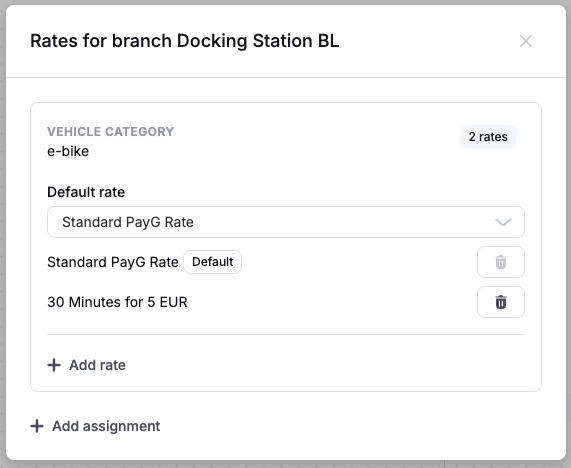
Rate Selector now available on On Demand Pricing Bundles: Rate Selector configuration is being moved over to Pricing Bundles. Multiple pricing bundles can now be assigned to a vehicle at a specific branch, allowing end-users to select which rate they want to use during rental start. Operators using the Rate Selector through deprecated pricing capabilities will be contacted and migrated automatically.
New Dashboard
Booking
Correct Tooltip When No Vehicle Is Assigned: When a booking had no vehicle assigned, hovering over an unavailable action showed "Insufficient permissions" rather than a useful explanation. The tooltip now clearly states that no vehicle has been assigned, so operators know exactly what to resolve.
Events Tab Filtering Now Applies to All Events: When filtering the Events tab on a rental the selected filters (event type, date range, error flag) now apply to vehicle events that occurred during the rental as well as the rental's own events. Previously, vehicle events came back unfiltered regardless of what the operator had selected, making it harder to isolate specific activity.
Filter the Events stream by type, date and operator
The Events tab can now be narrowed by event type, date, and the operator who triggered the event, with operators searchable by name. On accounts with a long event history you can go straight to the period or the activity you are investigating. Works on both the user and the rental Events tabs, and the error filter is unchanged.Reload Button Added Across Data Views: A reload button is now available on the rentals, users, and bookings views in the Dashboard. Previously, navigating away and back did not refresh the data, requiring a full page reload to see recent changes.
General
Identity Verification Rejection Now Visible in Dashboard: When a rider's identity verification is rejected by the verification provider, the rejection status now appears correctly in the Dashboard user view. Previously the status was not reflected, so operators could not see at a glance why a user was blocked from completing verification.
Invoice Detail View Loads Significantly Faster: The invoice detail screen now uses a dedicated endpoint that returns all line items, including refund breakdowns, in a single call. The previous approach required a slower back-office API call that averaged over one second per invoice and could reach five seconds where refunds were present. Operators will see invoice details load much faster.
Rate Selector Configuration Now Available in Pricing UI: The Dashboard UI for pricing bundles now supports configuring and managing multiple pricing bundles per branch and vehicle category, including setting a default bundle and enabling rate selection through the existing pricing options flow. This completes the operator-facing configuration for the rate selector behavior introduced in the backend earlier.
Custom Compensation Vouchers for Customer Care: Operators can now issue customer care vouchers with a custom monetary value or a custom number of free minutes, rather than being limited to preset amounts. This makes it possible to compensate a rider for the exact time or cost lost in situations such as a failed vehicle lock.
Platform
General
Voucher Expiry Reflected Immediately: Promotion vouchers now switch to "Expired" at the configured end time rather than remaining "Active" for several minutes afterward due to scheduler timing. Riders see the correct status as soon as the validity window closes.
Vehicle Pricing Correctly Resolves On-Demand Bundles: Vehicles with on-demand legacy pricing bundles now return the correct pricing information through the vehicle detail endpoint. Previously, affected vehicles returned a "no pricing found" error or only an extra-fees entry with no usable rental price.
API
General
New Endpoint: List Cities with Stations: A new endpoint returns the cities where an operator has at least one operational station. Booking clients can use this to let riders browse by city without already knowing a city name, enabling discovery for operators with stations across multiple cities.
Station Search Returns Names and Addresses: The search endpoint now matches against station names in addition to street addresses, and returns each matching station with its readable address. Previously, a user searching by station name received no results unless the name happened to match a place name, and the station list carried coordinates only.
Rental Error Responses Now Return Accurate HTTP Status Codes: Rental API errors that reflect a user-fixable condition (wrong rental state, missing helmet, vehicle still on, tailbox open) now return the appropriate status code (409 for state conflicts, 412 for vehicle precondition failures, 502 or 504 for device issues) rather than a generic 500. This allows booking clients and integrators to handle these conditions correctly and show riders a relevant message.
Data / BI
General
Verified questions to ask Wunder AI, with the wording to type: The help centre now carries a library of real operator questions across six areas, from revenue and promotions through fleet condition to rider retention and bookings. Each one gives you the exact wording to type, what the answer looks like, what you can decide from it, and where the answer stops being reliable. Find it in the help widget in your dashboard
Rider feedback answers now respect the period you ask for, and rank by rating: You can ask Wunder AI what riders reported in a given period and get only that period's feedback, with the ratings riders left shown beside each theme so you can rank by how badly a theme scored rather than by volume alone. Questions phrased the way you would actually ask them — why riders end a trip straight away, which tags sit behind a complaint theme — now land on rider feedback. Try it: "Show rider feedback themes with their average rider rating for the last 3 months"
Revenue breakdowns by price component now include time-based revenue: A breakdown of gross rental revenue by price component now covers time alongside driving, parking, unlock fee, distance and reservation, so the components add up to the rental revenue above them. If your rentals are price-capped, that revenue now appears in the breakdown instead of reading as zero. Try it: "Show gross rental revenue by price component by month for the last 6 months"
Audit Table Documentation Corrected: The documentation for the vehicles audit table now correctly explains that the revision timestamp comes from joining to the revision info table, not from the created-at column (which records when the vehicle was first created, not when the audit row was written). Operators and partners who query audit history directly will no longer be misled by a column that appeared to show a frozen timestamp.