
Wunder Mobility changelog
Release 41-2026 - Map Discovery, Booking Fixes & Platform Resilience
Highlights
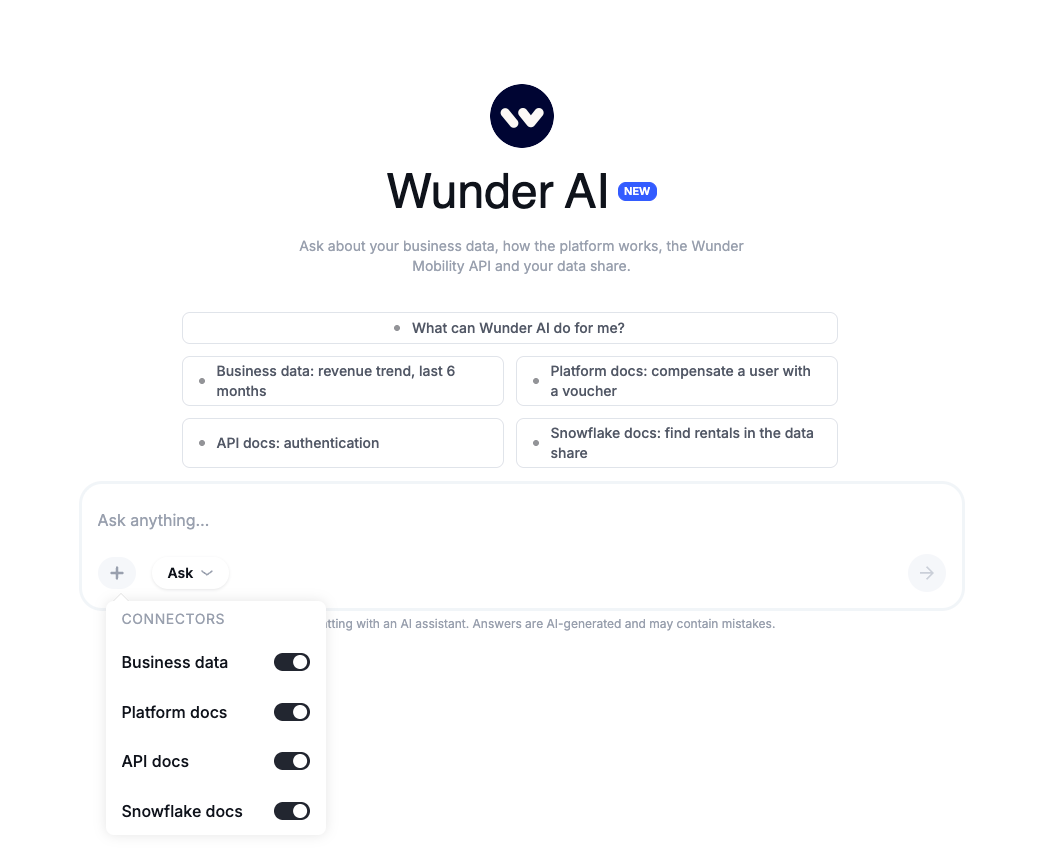
Wunder AI now answers from your documentation, not only your data: Ask Wunder AI how something works in the platform, how to use the Wunder Mobility API or what is in your Snowflake data share, and get the answer with its source. The new start screen shows what you can ask in each area.
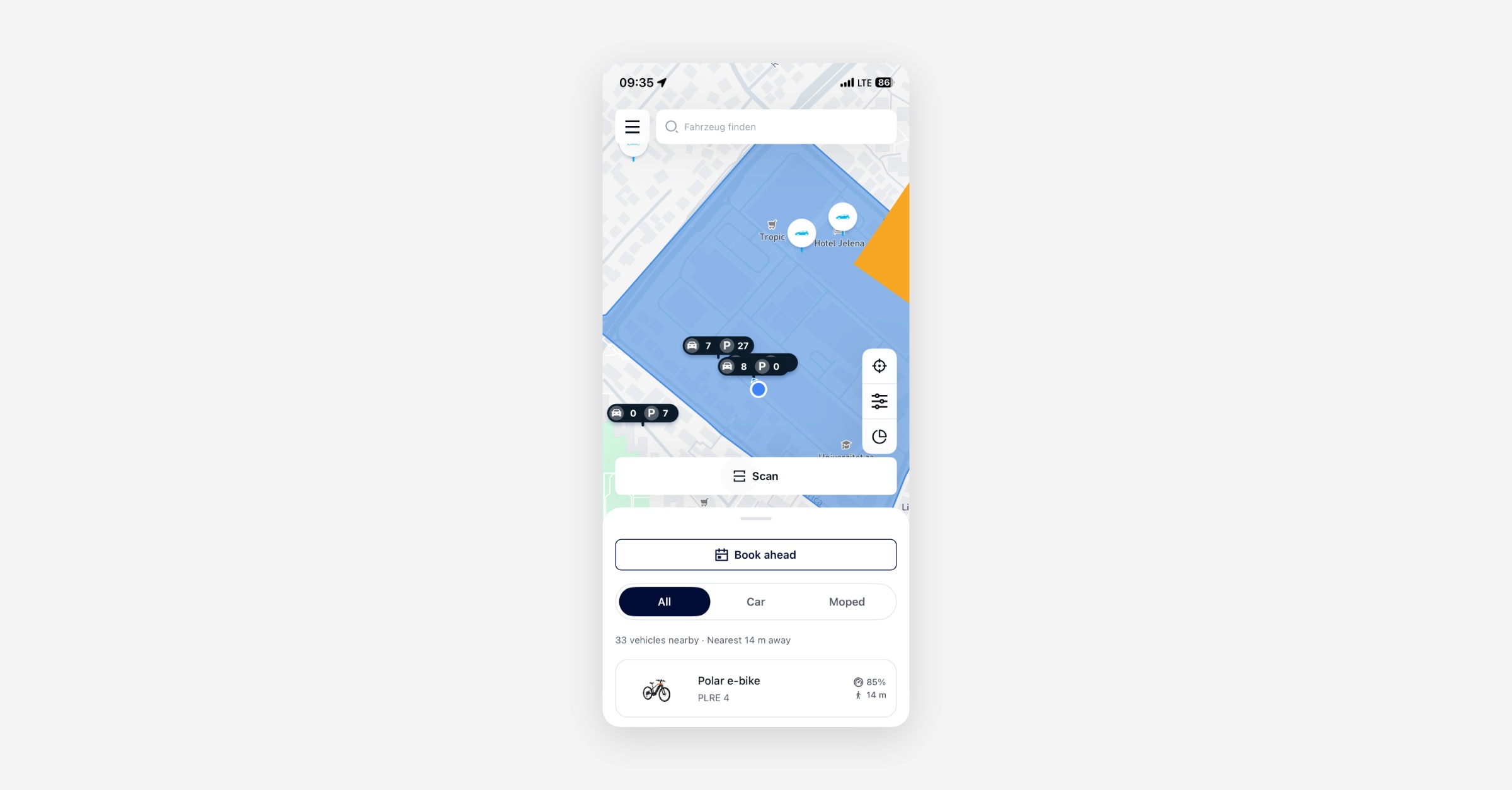
Nearby Vehicle Sheet on the On-Demand Map: Riders using the on-demand map will now get a bottom sheet listing vehicles close to them, with distance and battery level shown at a glance, without panning and tapping individual map pins. The sheet can be expanded and minimized to give the user the chance to see more or focus on the map interaction. The nearby-sheet should your the users to find the ‘best’ vehicle faster without longer map interaction.
Mobile App
Requires the latest app version. Contact your Customer Success Manager for details.
On-Demand
Nearby Vehicle Sheet: Riders on the on-demand map will see a bottom sheet at their preferred height to see the vehicles nearest to them, sorted by proximity with distance and charge level visible before tapping a pin. This removes the need to pan the map to find available vehicles and check across them.
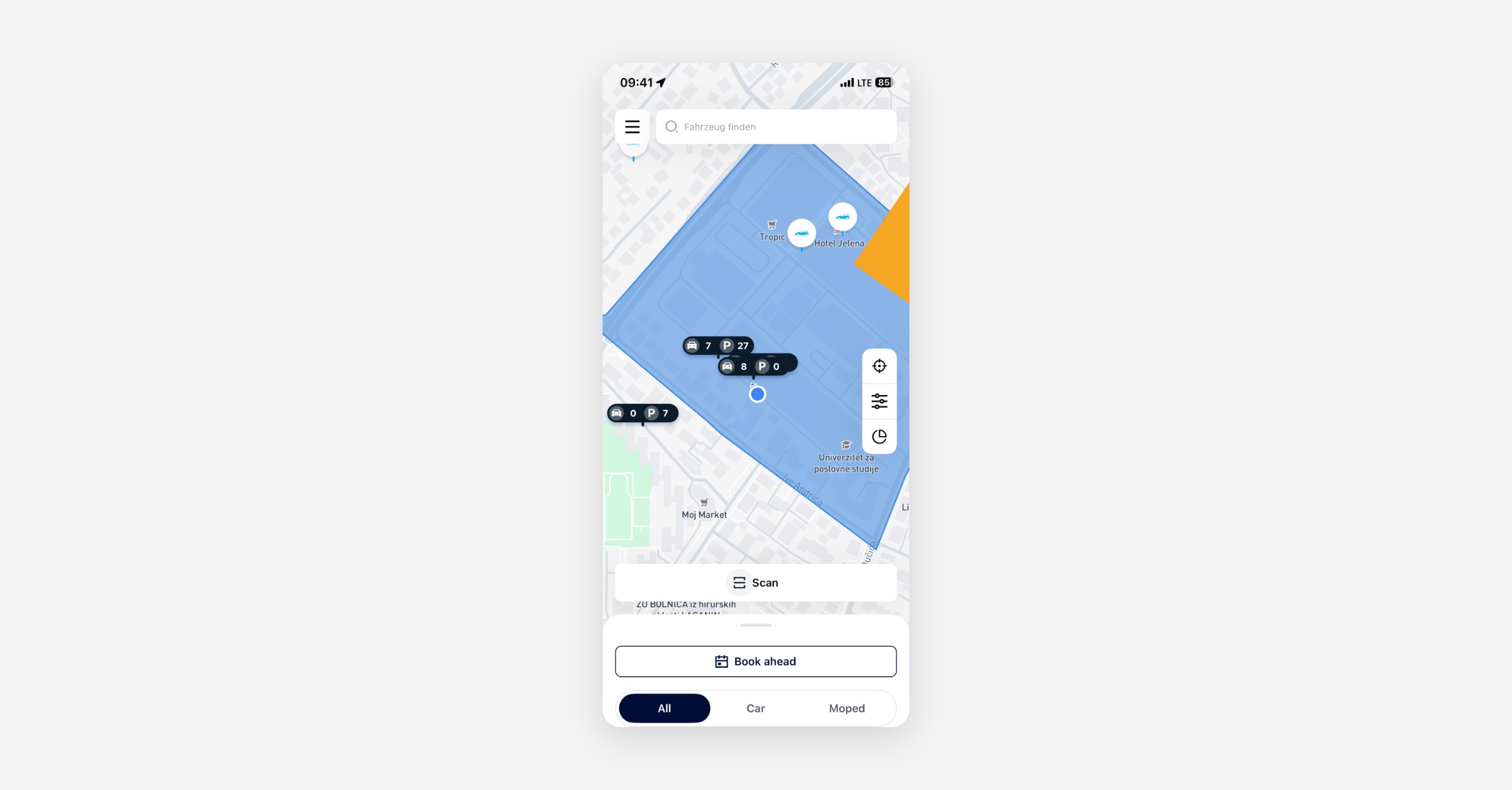
Repositioned Map Controls: The menu has been moved to top left position to give more space to the map control elements as locate-me, search, filter, and radar on the on-demand map home screen.
Booking
Booking Timestamps on Non-Latin-Numeral Devices: On devices set to a locale that renders numerals in Eastern Arabic-Indic digits, the app was sending booking start and end times the backend could not parse, returning an error and preventing the booking from completing. Timestamps are now always sent in the format the backend expects, regardless of device locale.
S153 Error on Valid Booking Requests Resolved: Some users were seeing a recurring "start or end time is in the past" error (S153) during normal booking use on the latest app version. The root cause has been identified and corrected so that valid booking requests no longer trigger this validation error.
General
App Launch Error After Bad Charging Station Data: If a malformed charging station list was saved to the device, the app showed a generic error screen on every subsequent launch and no retry cleared it. The cached data is now validated and replaced on the next successful fetch, so the app loads normally again.
New Dashboard
Booking
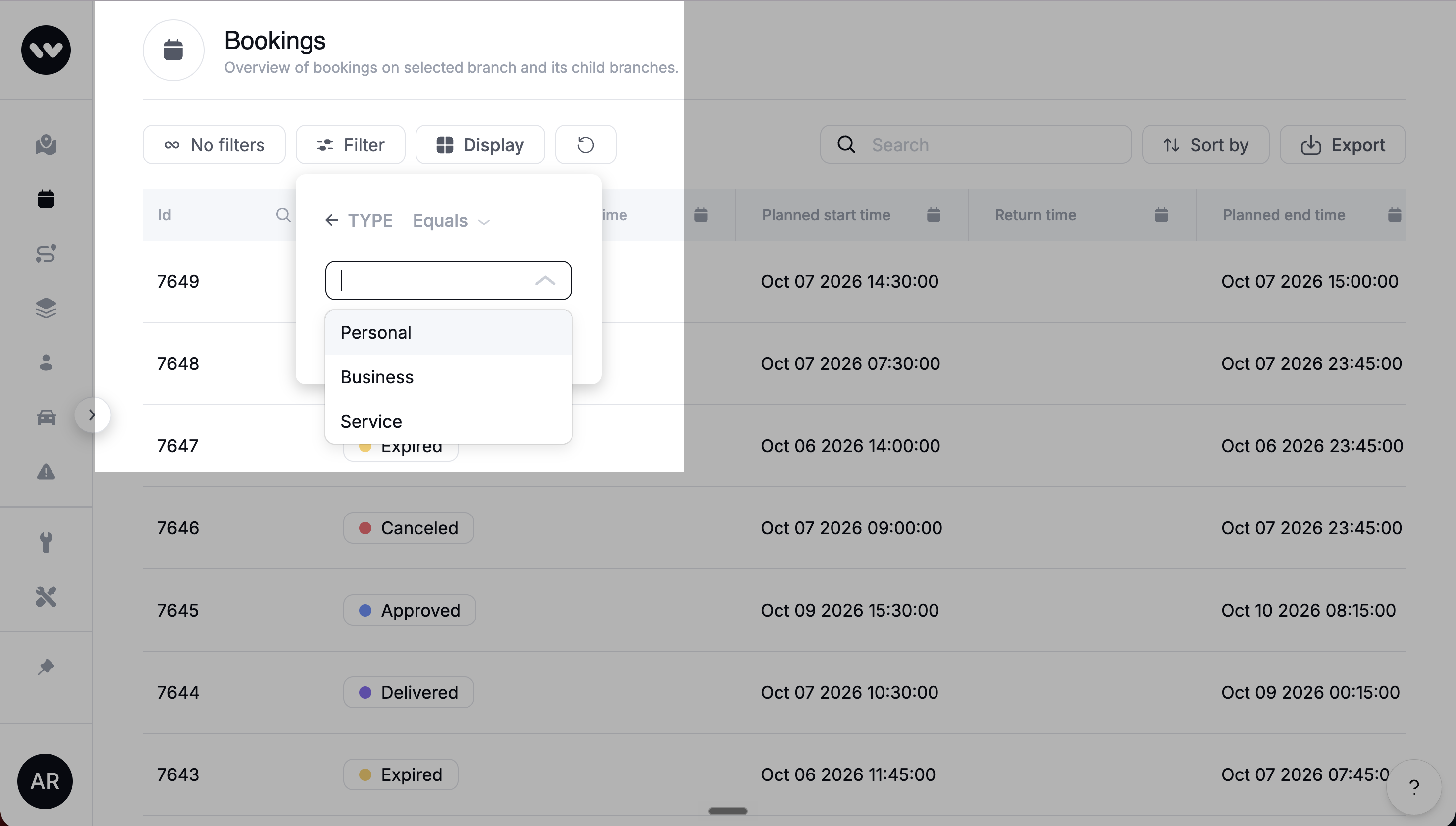
Booking Type Filter: The Bookings list now includes a filter by booking type (Personal, Business, Service), and the Type column displays the same values. The earlier filter by Station or Floating has been removed, as Floating bookings are no longer in use. Operators can now segment and search bookings by the categories they actually work with.
Extending a Booking Whose Start Is in the Past: When an operator edited a booking whose start time was already in the past, the dashboard blocked the change with a "start time must be in the future" error even when only the end date was being extended. This is now corrected: operators can extend the end of an in-progress or past-start booking without the start-time validation firing.
Service bookings show the cooldown that actually applies: When you create a service booking, the cooldown is set to 0 minutes and can't be changed. Before, the field showed your default cooldown, but it was never applied to service bookings. The vehicle is available again as soon as the service booking ends. If you need a cooldown after a specific service, you can add one by editing the booking after it's created.
Service bookings are no longer blocked by vehicle availability checks
Field teams can now start a service booking on the assigned vehicle even when it is below its target charge level, set to Out of Order, or on critical battery. These checks exist to protect end users, so they no longer stop your staff from reaching the vehicles they need to charge, clean or repair. Customer bookings are checked exactly as before, including the charging restriction.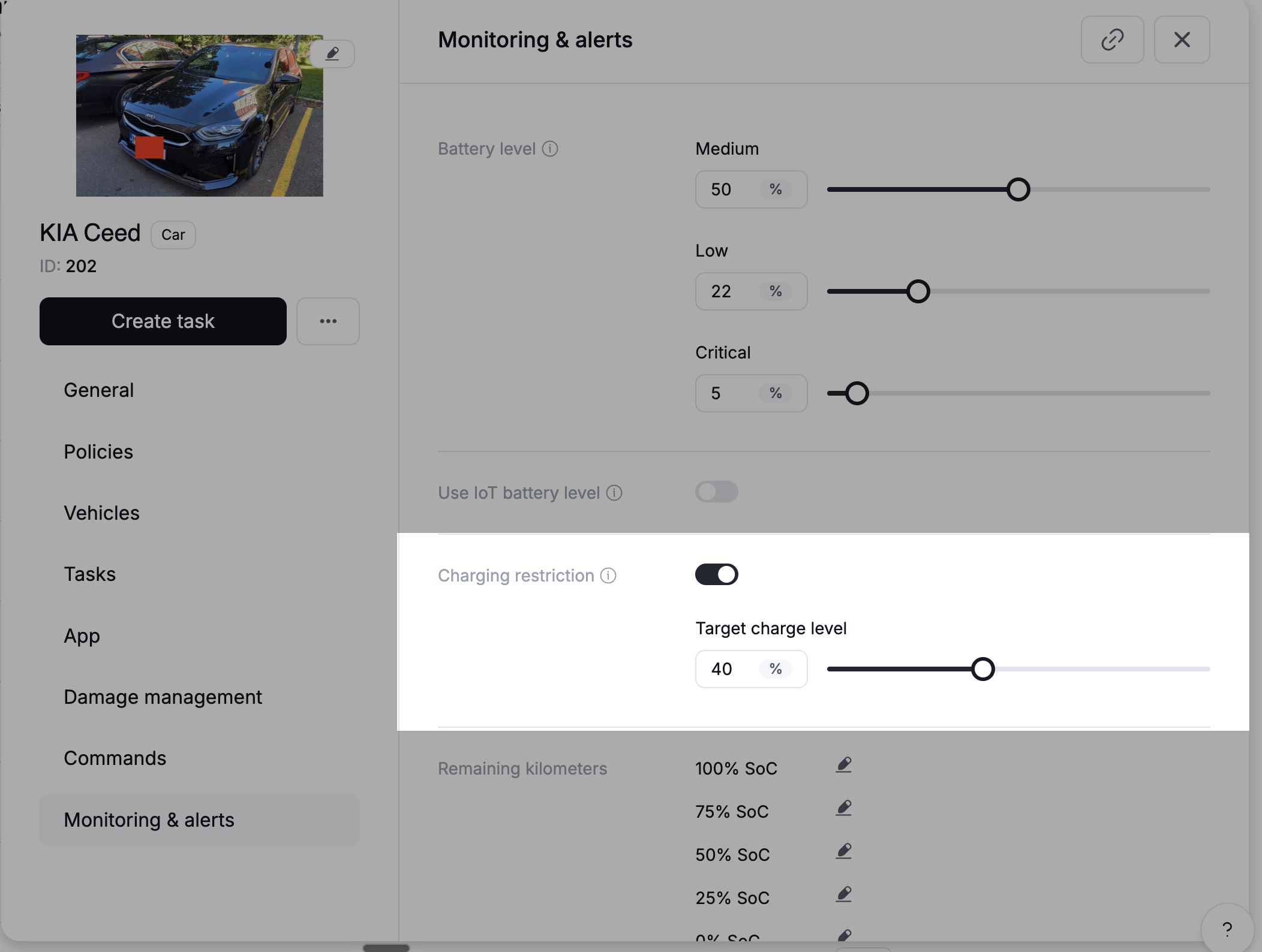
General
Dashboard maps now show only active promotion and surcharge areas
Deactivated geofence promotions and surcharge areas used to appear on the map next to active ones, so it was hard to tell which were actually in force. Every map in the dashboard now shows only active areas. Deactivated areas are still in your list, where you can reactivate them anytime.Swapped Latitude and Longitude Labels Corrected: The rental events view in the Dashboard was displaying longitude values under the "Latitude" label and vice versa. The labels are now aligned with the correct coordinate values.
Blank Localization Overrides Now Fall Back to Platform Default: If a localization override contained only whitespace, the platform returned it as a valid value and the app rendered a notification with no text. Overrides that contain only spaces or line breaks are now treated as absent, and the built-in platform default is used instead.
Platform
Booking
End users get another reminder after extending a booking: End users get a reminder shortly before their booking ends. If they extended after that reminder, they didn't get another one before the new end time. Now they do, as long as the new end time is further away than your reminder setting. If they extend before the first reminder was due, the reminder simply moves to the new end time.
Booking Price Calculator Returns a Clear Error for Unconfigured Pricing: When the booking price calculator was called for a branch and vehicle category with no pricing bundle assigned, it returned a server error (HTTP 500). It now returns a proper client error (HTTP 404) with a message that makes the missing pricing configuration visible, matching the behaviour of the back-office endpoint.
Max Booking Duration No Longer Defaults to Zero: When the maximum booking duration setting was absent, the backend fell back to zero, which blocked bookings or edits with a "duration exceeds maximum" warning. The backend now uses a safe default so missing configuration does not behave like a zero-duration limit.
Vehicles / IoT
ICCID Processing Skipped When Vehicle Module Is Unlinked: Unlinking a vehicle module during a telemetry update window caused a processing error that surfaced as a server fault. The platform now checks for an absent module before processing telemetry and skips gracefully, preventing the error.
General
Branch Deletion Now Checks All Referencing Tables: The check that prevents deleting a branch still referenced by other records had drifted out of sync with the schema and missed several tables. Attempting to delete such a branch could result in a broken reference rather than a clean error. The check now covers all referencing tables, so branch deletion is blocked correctly when references exist.
HTTP 500 Replaced With Correct 4xx Errors for Common Framework Exceptions: Several runtime exceptions that represent client-input problems were falling through to a generic server error (HTTP 500). They now map to 409 Conflict or 404 Not Found as appropriate, making the responses actionable for callers and reducing false positives in error monitoring.
Vehicle Update With Malformed Position Returns a Readable Error: A vehicle update request that sent a position object missing the required type field returned an opaque parsing error with no indication of which field was wrong. The response now identifies the malformed field and explains what is expected.
API
General
Planner No Longer Strands Earlier Bookings in Favour of Later Ones: The vehicle planner was in some cases assigning a vehicle to a later-created booking and flagging an earlier booking as a conflict, reversing the correct priority. The planner now correctly protects the earlier booking and blocks the conflicting later request.
Task Assignee No Longer Cleared on Update: Updating a task via the API without including an assignee field was incorrectly removing the existing assignee. A PATCH request now leaves the assignee unchanged when the field is omitted.
Data / BI
Wunder AI
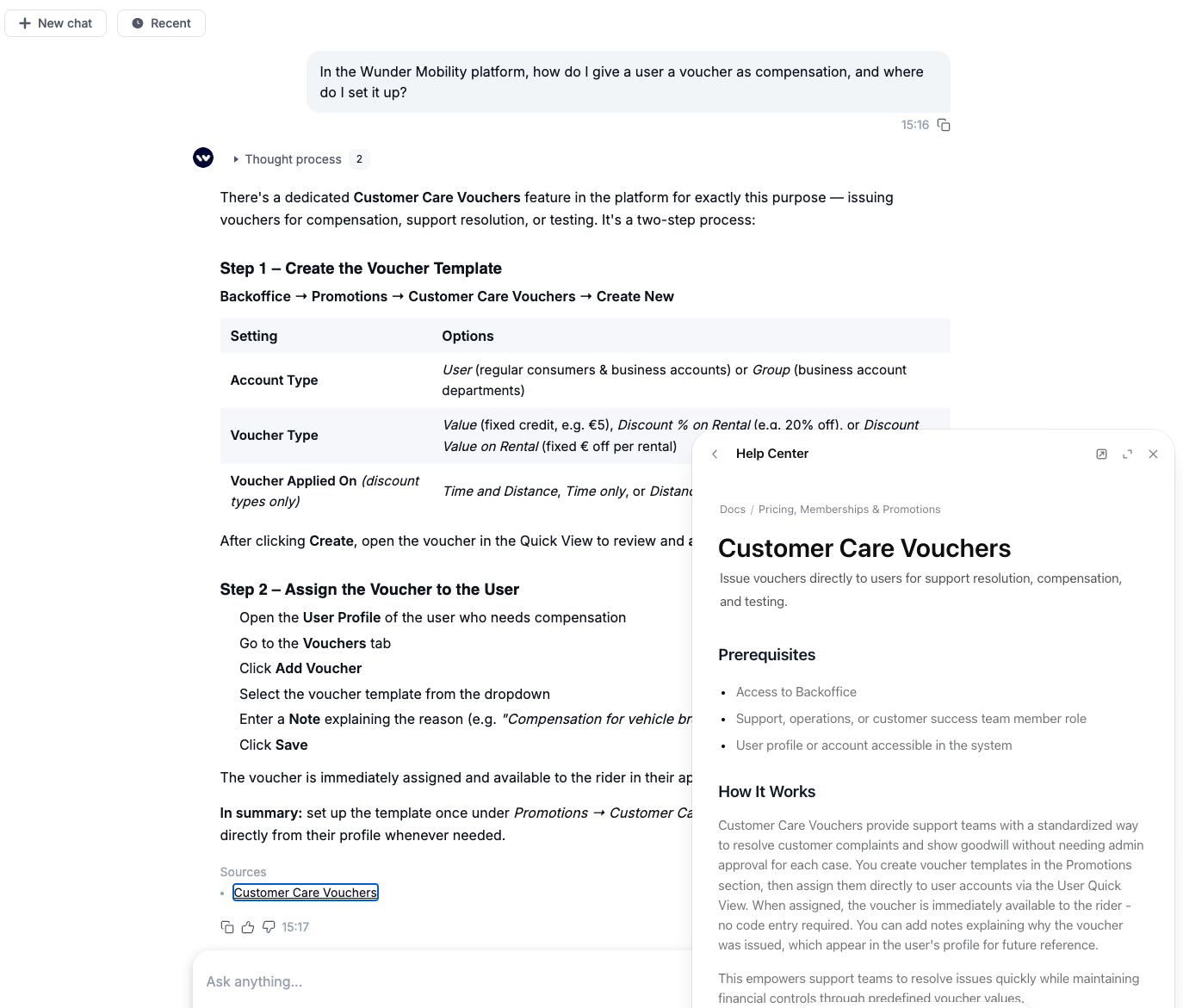
Ask Wunder AI how the platform works: Wunder AI answers how-to and configuration questions from the help centre and links the article it used, which opens right next to the chat. Try it: "In the Wunder Mobility platform, how do I give a user a voucher as compensation, and where do I set it up?"
Ask about the API and your data share: Wunder AI answers questions about Wunder Mobility API endpoints, authentication and webhooks, and about the tables, columns and KPI definitions in your Snowflake data share. Try it: "How do I authenticate against the Wunder Mobility API, and how long is a token valid?"
Choose which sources Wunder AI uses: The (+) menu next to the input lets you switch Business data, Platform docs, API docs and Snowflake docs on or off.
See what you can ask from the start screen: When you open Wunder AI, the start screen shows one example question per area, and "What can Wunder AI do for me?" gives an overview of what you can ask for your role.
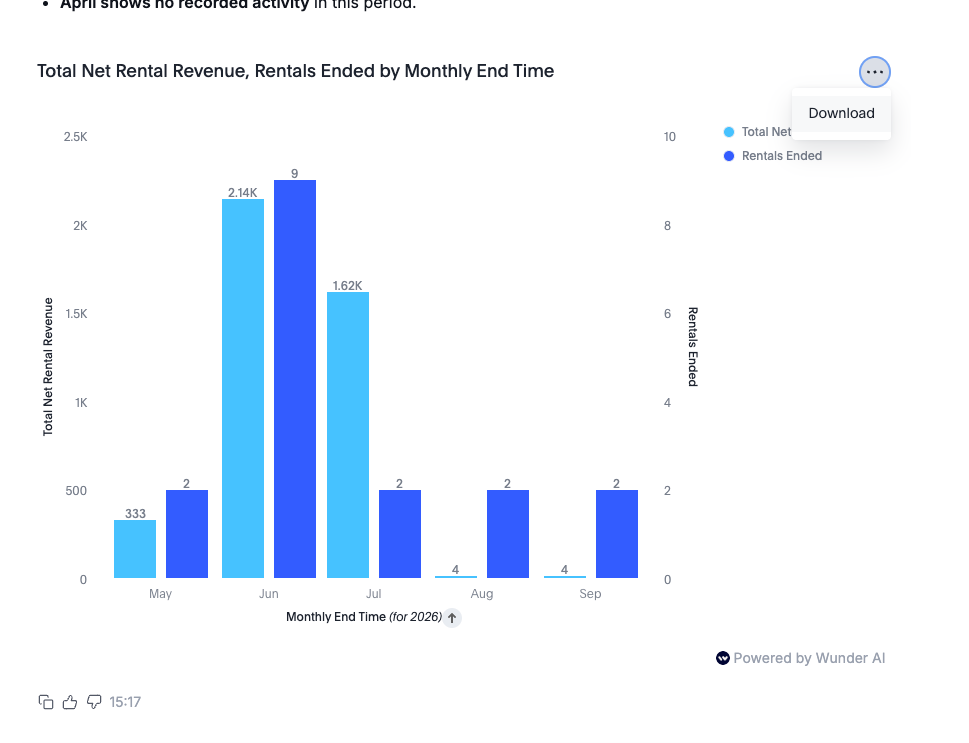
Interactive charts you can download: Charts in Wunder AI answers are now interactive instead of a static image. You can download them straight from the answer.
Track bookings that expire while waiting for approval: If you approve bookings manually, you can ask Wunder AI for booking approval timeouts, the bookings that expired before anyone made an approval decision, as a count or as a share of the bookings that needed one. No-show rate now counts only bookings that were ready for pickup and never collected, so on some fleets it reads lower than before. Try it: "Show booking approval timeouts and booking approval timeout rate by month for the last 3 months"