
Wunder Mobility changelog
Release 42-2026 - Reliability, Billing Integrity & Fleet Management Improvements
Highlights
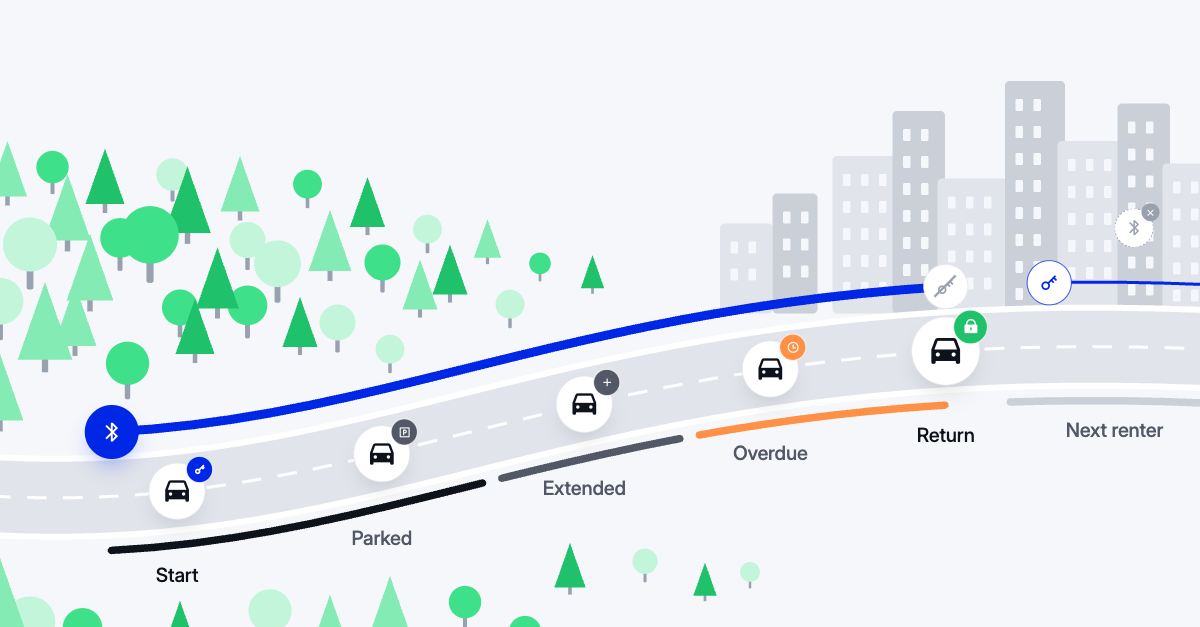
Bluetooth access made reliable: A Bluetooth key now stays valid for as long as the rental actually runs, through extensions and overdue bookings, so your end users can lock and unlock offline right up to the return. The moment a rental ends, the key is retired and the next renter starts clean. Late-arriving Bluetooth events can no longer affect a rental that has since changed hands. And locking a vehicle is always treated as the safe end of a trip, so it no longer raises misuse alerts to your team.
Billing Integrity Protected Against Payment Gateway Failures: When a charge request to the payment provide doesn’t return payment feedback, the invoice and payment are now parked in “In Payment” instead of being treated as a failed payment and retried. This makes the payment handling process significantly more resilient against transient upstream payment and network errors, and significantly improves payment status integrity.
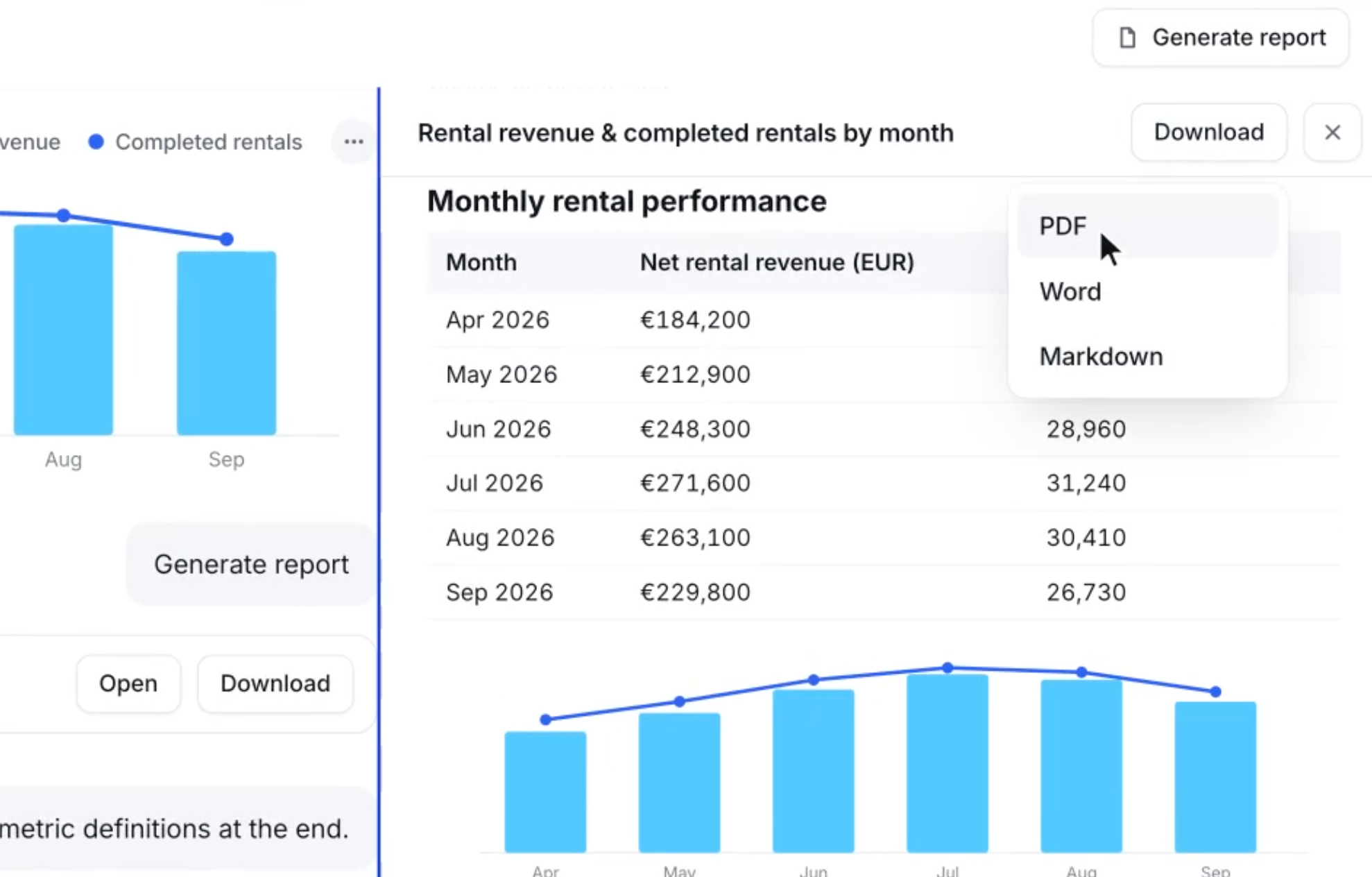
Turn a Wunder AI conversation into a report: Generate a report from your conversation, with the relevant charts included, and download it as PDF, Word or Markdown to share with your team.
Mobile App
General
Tracking preferences editable in the app
End users can now review and change their tracking consent at any time from their profile, under Edit Account > Tracking preferences. Changes take effect immediately, so withdrawing consent is as simple as giving it.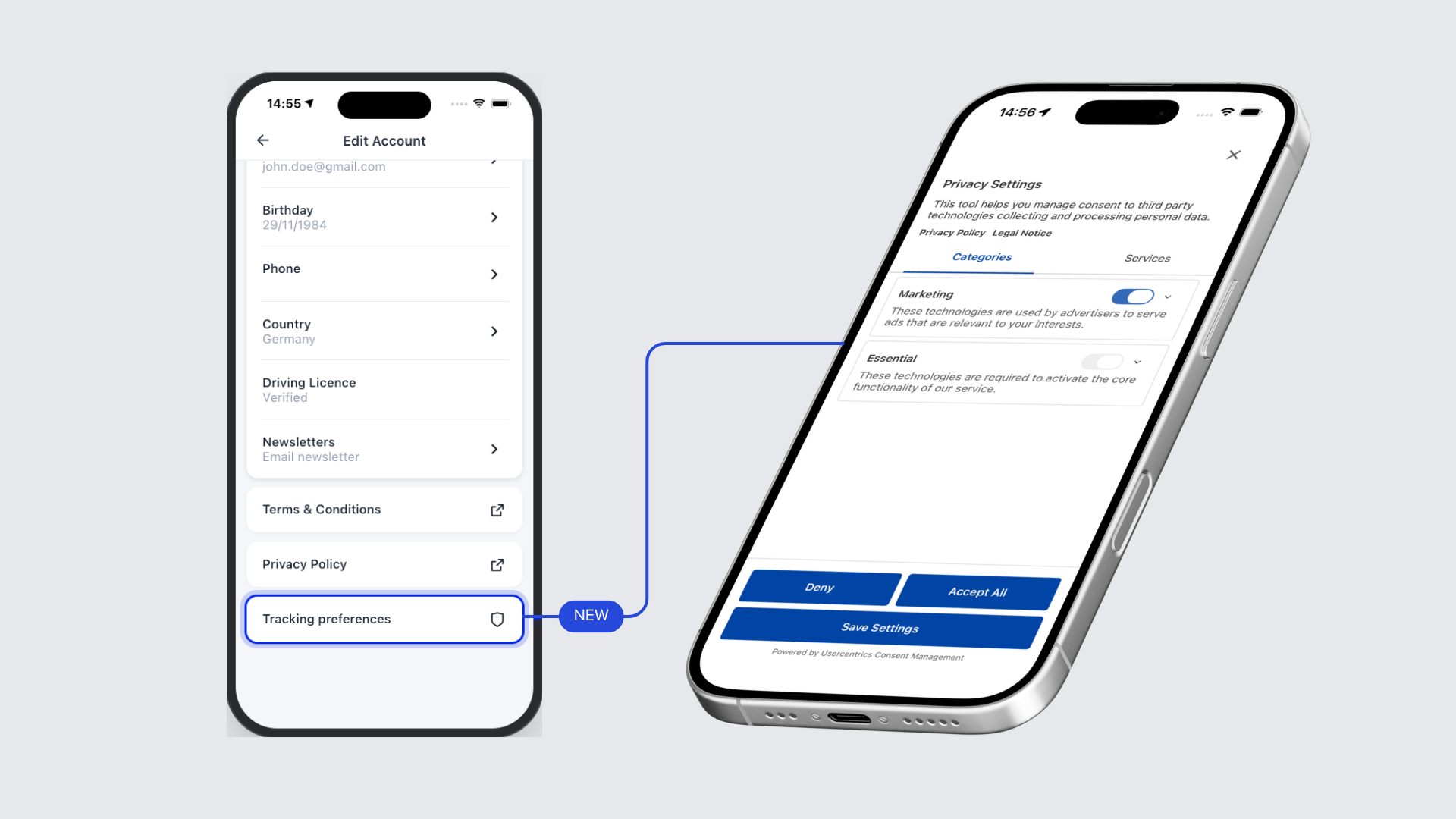
Vehicle feature chips now respect the app language: Feature chip labels on the vehicle card (for example, fuel type and transmission) were always shown in a fixed locale regardless of the rider's phone language. They now render in the correct app language, if translations are provided. Otherwise they fall back to the configured default language.
New vehicle sheet supports independent price translations: The new vehicle sheet can now carry its own shorter price text independently of the old vehicle view, so the two screens can show appropriately worded pricing without either affecting the other.
Booking conflict error no longer appears when switching from an upcoming-booking card: An edge case where a rider who had an upcoming booking visible on the map received error R160.3 after creating a new booking in that same session has been resolved.
Active rental modal no longer briefly shows stale state on relaunch: On Android, force-quitting and relaunching the app during an active rental caused the active-rental modal to briefly show the previous state before updating. The modal now shows the correct current state immediately on launch.
On-Demand
POI on the on-demand map can now deep-link into its associated pre-booking station: A point of interest on the free-floating map can now carry a deep link that opens the matching pre-booking station's booking flow directly inside the app, rather than redirecting to the browser or app store. This can be helpful for operators offering on-demand and pre-booking in parallel.
New Dashboard
General
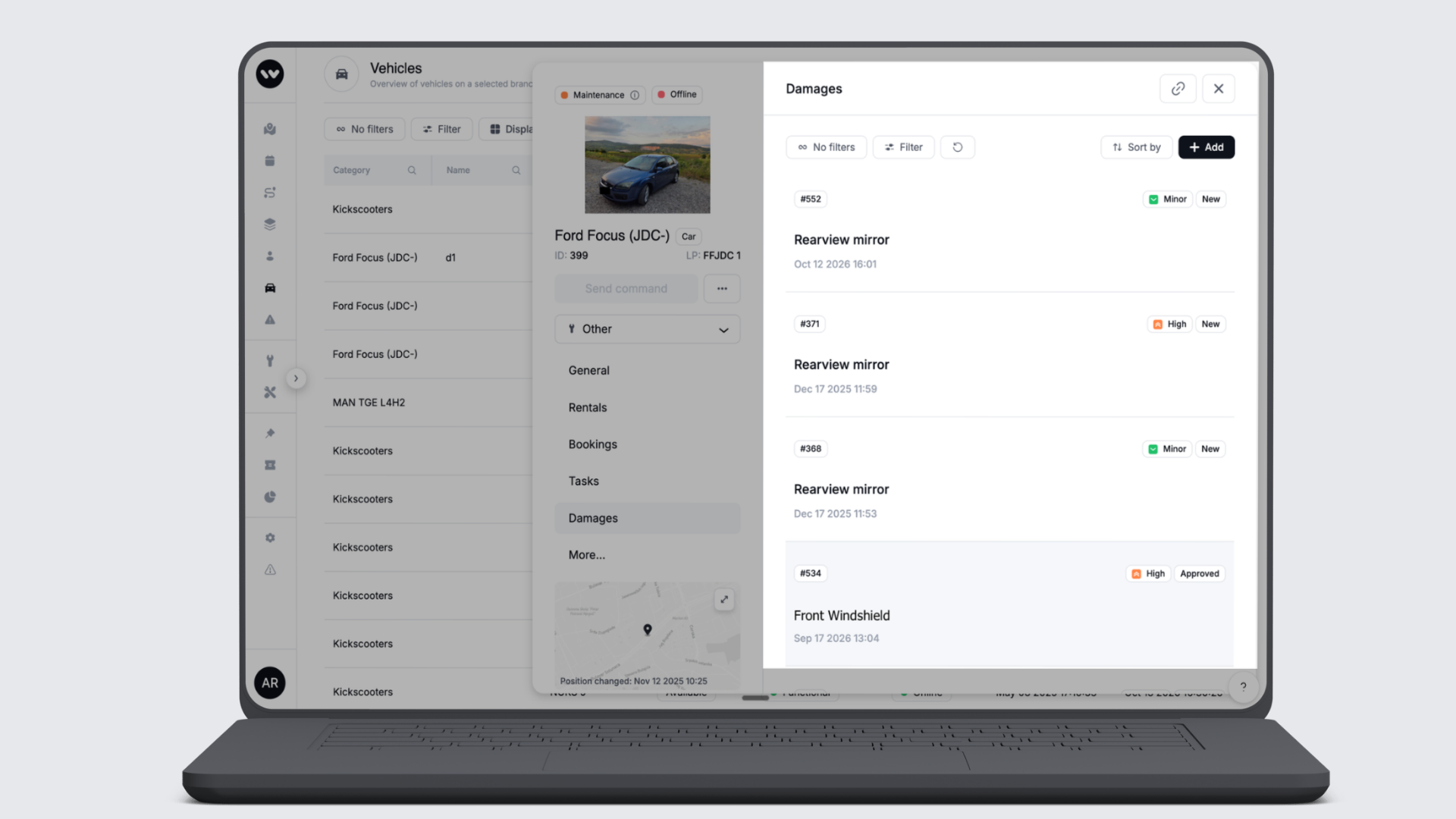
New damages shown first in the vehicle side panel: The Damages tab of the vehicle side panel now lists damages in status New at the top, sorted by date created, newest first. The remaining statuses follow in the same order. Your fleet managers open a vehicle and see what still needs attention without filtering first. Any sort you choose yourself still applies as before.
Cancellation fee checkbox no longer appears on service booking cancellations: The "Include cancellation fee" option was incorrectly shown when cancelling a service booking. Service bookings do not have cancellation fees, and the checkbox has been removed from that flow.
Date of birth field renders correctly on user profiles: A display defect on the user profile date-of-birth field causing the picker to be partially hidden behind other elements has been resolved.
Vehicle and reservation cancellation reasons now configurable in the Dashboard: Operators can now manage vehicle features and reservation cancellation reasons in the black Dashboard, removing the need to use the legacy back office for these settings. This also means operators running purely on-demand fleets can set vehicle features for the first time, since the legacy dashboard only exposed this on bookable categories.
Enter colour codes directly
Wherever you pick a colour in goDash, you can now type or paste a HEX code into the new Hex field instead of dragging to match it. The picker and the code stay in sync, so brand colours land exactly as specified, whether for vehicle category visuals, app design or map areas.
B2B
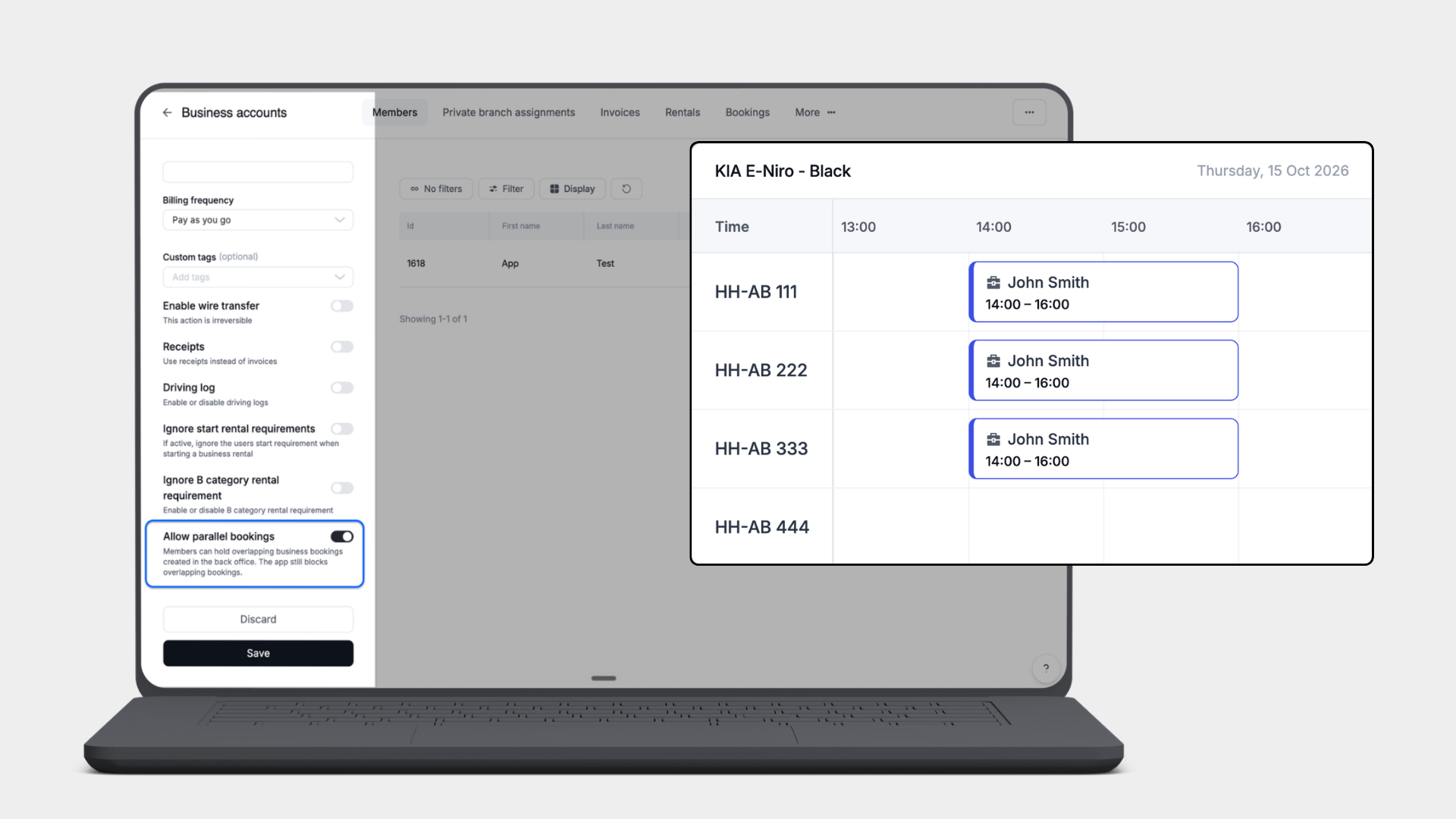
Parallel business bookings now configurable per business account: Operators can now enable parallel bookings for a specific business account, allowing members of that account to hold overlapping bookings created in the back office. This is useful for fleet managers who need to reserve multiple vehicles simultaneously, for example for group test drives or employee programs. The setting is off by default and does not affect personal bookings.
Platform
General
Customers no longer stay blocked after an invoice leaves collection: When an invoice was marked for collection and subsequently written off, paid, or disputed by any route other than "paid externally", the customer's account remained blocked and could not start a rental. The block is now lifted correctly regardless of how the invoice exits the collection state.
Riders are no longer signed out after changing their phone number during onboarding: A race condition could cause the first token refresh after an onboarding phone number change to fail, signing the user out immediately. This has been resolved and the session now continues correctly.
Vehicle pricing returns correct values for bundle-priced tenants: Since release 1.261.0, vehicles whose pricing was defined via a pricing bundle returned all zeros (unlock fee, per-minute driving and parking rates) in both the vehicle listing and rental detail responses. Correct prices are now returned.
Promotion discount badge now respects user tag visibility conditions: When a vehicle promotion is restricted to users with specific tags, the discount badge on the vehicle card is now only shown to riders who match those tags. Previously all riders saw the badge regardless of eligibility.
Saving a promotion twice simultaneously no longer duplicates its benefits: A race condition allowed two overlapping save requests on a promotion to produce duplicate benefit entries, causing riders who redeemed the promotion to receive the benefit twice. The fix ensures only one set of benefits is persisted regardless of concurrent saves.
Bluetooth access tokens invalidated correctly at rental end: When a rental ends, whether the end user ends it in the app or your team ends it in goDash, every Bluetooth key issued for that rental is retired at once. That includes keys issued at the booking stage, before pickup, so a vehicle is never left with a working key from its previous renter.
Late Bluetooth actions no longer affect a rental that has moved on: A Bluetooth lock grants no access, so it no longer triggers a key misuse alert to your team or a message to the end user. The vehicle’s event log records it as a lock, with the user and key attached for investigation. A lock by anyone other than the renter cannot end or park that renter’s rental. Unlocks are unchanged: misuse detection and its alerts still apply.
Locking a vehicle no longer triggers false fraud alerts: A Bluetooth lock is the safe end of a trip and grants no access, so it no longer triggers a key misuse alert to your team or a message to the end user. Every lock is written to the vehicle’s event log as a lock, with the user and key attached, never as misuse. A lock by anyone other than the renter cannot end or park that renter’s rental. Unlocks are unchanged: misuse detection and its alerts still apply.
Bluetooth keys cover extensions and overdue bookings: A Bluetooth key issued for a booking now stays valid until the booking ends plus a two-day allowance, so an end user who runs over or returns late can still lock the vehicle and end the rental offline. Extensions are covered by the next key the app requests. Keys are retired early if the booking is cancelled, declined or expires, or if its vehicle or user changes. The allowance is set per branch and can be adjusted by your Customer Success Manager. Applies to bookings on vehicles connected via INVERS OneAPI.
Duplicate charge prevention when payment provider returns no response: When a charge to the payment provider failed at the network level with no response, the platform marked the attempt as failed and retried, potentially charging the rider twice if the original charge had in fact been captured. The platform now marks such attempts distinctly and matches any captured payment before retrying, preventing duplicate charges.
FitRider rental starts when the bike leaves the dock early: When a rider pulls a FitRider bike out before the dock has confirmed the rental start, the platform now sends a second start command instead of re-locking the rear wheel. The rental begins and the wheel stays free while the rider is already holding the bike.
Accurate mileage on Yadea G5L vehicles during battery swaps
A Yadea G5L with both batteries removed reports a placeholder value instead of its odometer reading. That value is now ignored, so the vehicle keeps its last real mileage and a rental that ends during a swap records that reading as its end kilometres.
API
General
Driving logs now include trip start time as well as date: The driving log API response now carries a full date-and-time value for each trip's start, in addition to the existing date-only field.
gmData / BI
Wunder AI
Turn a conversation into a report: Select Generate report in a Wunder AI conversation to get a report built from it, with the relevant charts, in a side panel next to the chat. Download it as PDF, Word or Markdown to share it or take it into a meeting.
Download chart and table results as CSV or Excel: From the ⋯ menu on a chart or table in a Wunder AI answer, you can now download the result as CSV or Excel as well as PNG, so you can take the figures into your own spreadsheet.