
↵Open
Wunder Mobility changelog
Release 46-2026 - Fairer Subscriptions & Task Completion Records
Highlights
Subscriptions run from the moment of purchase: Daily, weekly, monthly and yearly subscriptions now last from the time a rider buys them to the same time one period later, instead of ending at midnight. Riders keep their benefits for the full period they paid for, and renewals no longer leave a gap of 2 hours between midnight, and the next renewal.
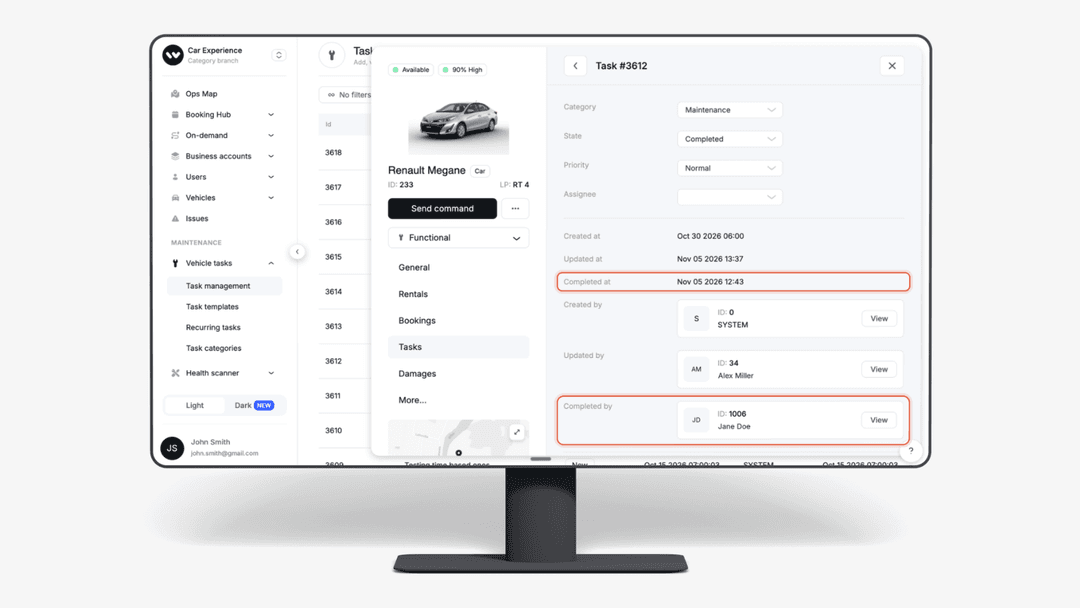
See when a task was completed and by whom: The Tasks view and the task detail in the Dashboard now show Completed at and Completed by, which stay fixed when the task is edited later. Operators reviewing field work get a reliable record of who finished what and when.
Mobile App
Requires the latest app version. Contact your Customer Success Manager for details.
On-demand
QR unlock no longer gets stuck on "Unlocking": When a rider selected or reserved a vehicle and then scanned or typed its code, the app could stay on "Unlocking…" without sending the start request or showing an error. The ride now starts as expected, removing a silent failure that affected riders since late September.
Vehicle price always visible on small phones: On smaller phones, the vehicle price on the new vehicle sheet is no longer cut off by the payment selector when the vehicle features take two lines max.
No more nearby vehicle sheet when switching between points of interest: Switching between points of interest no longer briefly opens the nearby vehicle sheet, and closing a point of interest no longer closes the vehicle the rider had selected.
Filters button stays reachable: The map's filters button stays visible and tappable while the nearby vehicle sheet is open.
General
Map buttons use your brand colour: The map buttons (top left, locate and search or filter) now use the Primary button color set in the Dashboard under App > Design, matching the preview there.
Web App
Booking no longer fails after switching station: On the web booking page, choosing a vehicle category at one station, then switching to another station and confirming, no longer fails with "vehicle not available" (S119.1). Riders can complete the booking at the station they finally picked.
New Dashboard
Booking
Conflicting bookings show their conflict in the edit form: A booking that the calendar marks as conflicting now shows that conflict in the Warnings section of its edit form, also when opened without changes, instead of reading "No issues". Operators can see what to fix before saving.
A-to-B conflicts flag the start station: For a conflicting A-to-B booking with an assigned vehicle, the station list and station dropdown now flag the start station, where the conflict has to be solved, instead of the destination.
General
Completed at and Completed by on tasks: The Tasks data view offers Completed at and Completed by as columns and filters, and the task detail side panel shows both. They are empty for tasks that are not in Completed state, and tasks completed before the API change show the values where the history records them.
Ops Map remembers your layer choices: The Operations Map now restores the layers each user last switched on or off after a refresh or a new visit. The choice is saved per user, so it follows them to any browser or device.
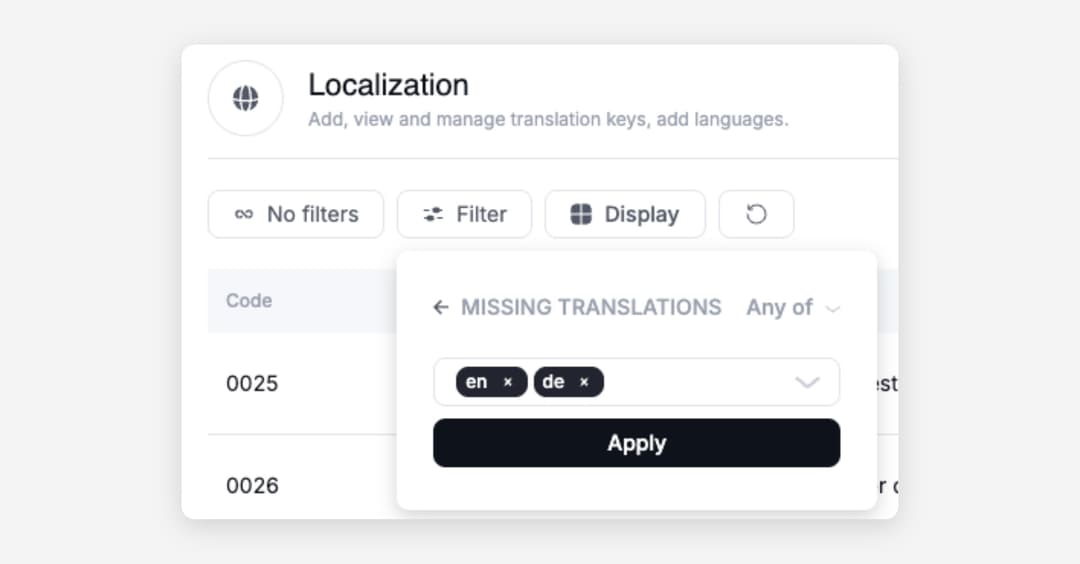
Find untranslated texts on the Localization page: Operators can now see, per language, which texts still only have the fallback text, making it faster to complete translations of their app.
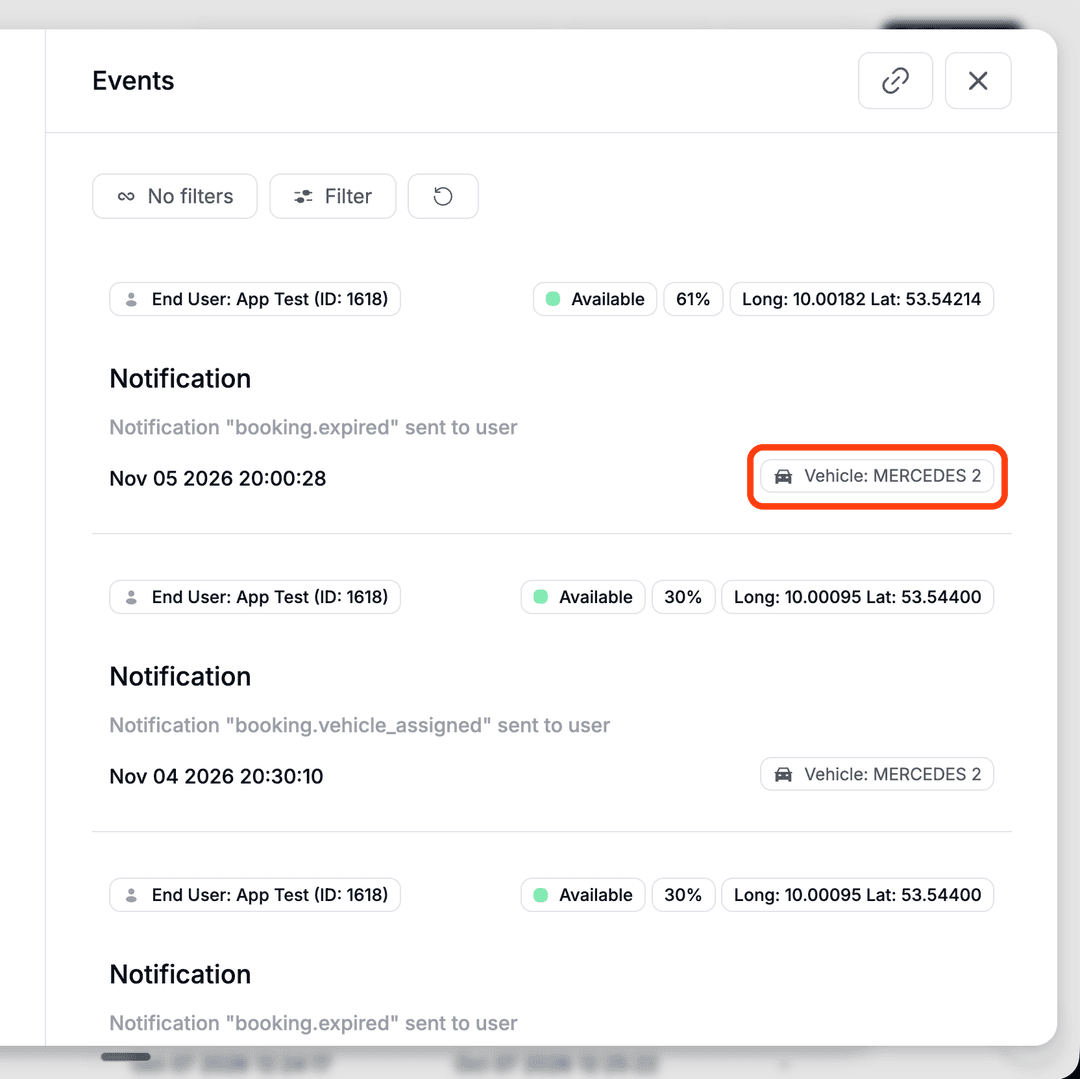
Vehicle ID shown on user events: User events now show the vehicle ID on vehicle-related actions, so operators can see which vehicle a user interacted with without cross-checking rentals.
Platform
Booking
Bookings re-planned as soon as a vehicle goes out of order: When an operator changes a vehicle's service state in a way that matters for bookings, for example from Functional to Maintenance or to Retired, the booking planner now reacts right away instead of up to 5 minutes later. Bookings and station availability stop showing a vehicle that can no longer serve them.
Pricing
Subscription Renewals run more frequently: Rolling subscriptions (daily, weekly, monthly, yearly) now run from the purchase time to the same time one period later, and the vouchers they grant expire at the same moment. Renewals are processed continuously instead of once a night at 02:00, so benefits no longer lapse between expiry and renewal. Subscriptions that start on the first of the month or year still start at midnight.
Subscription cancelled email shows the right name and end date: The subscription cancelled email now shows the subscription's name instead of its internal code, and the end date is no longer blank in the default template.
General
New permission for cancelling a user's subscription: Cancelling a user's subscription from the back office now requires the new permission
USER_REMOVE_SUBSCRIPTION. Every role that could already update subscriptions has received it, so nothing changes for existing roles; operators can now grant or withhold this action separately.No more sign-in codes while a user is blocked: When a user is temporarily blocked after repeated failed sign-in attempts, requesting a new email or SMS code is now rejected with a clear message instead of sending a code that cannot be used, which also saves SMS and email cost.
Data / BI
Wunder AI
Answers keep running if you reload: If you reload the page or close the tab while Wunder AI is still answering, the answer keeps running. Open the conversation again and you find it there.
Service App
Vehicle notes load even when a note has no title: In the Service App on iOS, one note without a title no longer makes the whole notes list fail with "Failed to Load Notes". Untitled notes now show their first line instead. Requires Service App 2.0.6.